Amazon A+ Content is an exciting opportunity to elevate your product listings. It’s your chance to paint a visual story that helps customers understand your brand, trust your offer and convert faster. That’s why it’s essential to create on-brand A+ Content and in a thoughtful approach. A+ Content can become an expensive, time-consuming project that delivers little value if not careful. If you don’t follow Amazon’s rules to the letter, your hard work could be rejected or cause unnecessary account headaches.
For growing brands, the stakes are higher than ever. Your A+ Content is often the first branded impression a customer gets and poor execution can do more harm than good. So before you hit publish, let’s talk about the most common missteps and how to steer clear of them.
What is Amazon A+ Content?

Previously known as Enhanced Brand Content, Amazon A+ Content is your product page upgrade. Instead of relying solely on the Amazon title, bullet points and images, Amazon offers Brand Registered sellers a set of advanced modules. Think comparison charts, lifestyle images, Amazon brand stories and custom formatting that you can’t access in the Amazon images section of your product detail page. These modules allow you to build an enhanced brand experience.
Premium A+ offers enhanced layouts, larger visuals, and video modules, but functionality remains primarily visual rather than interactive.
The Benefits of A+ Content
A+ Content might seem nice-to-have, but the data proves otherwise. Amazon listings with A+ Content have been shown to boost conversion rates by 3–10% on average, based on Amazon-backed studies. For customers comparing multiple options, your A+ Content often becomes the make-or-break moment that determines whether they choose your product or a competitor’s.
Done right, it reduces return rates by answering common product questions visually. A+ Content does not directly impact keyword indexing, but it can improve conversion rate and dwell time, which indirectly supports ranking performance. Even if you don’t see an immediate jump in sales, A+ Content is a long-term investment in brand perception and trust.
Amazon A+ Content Requirements
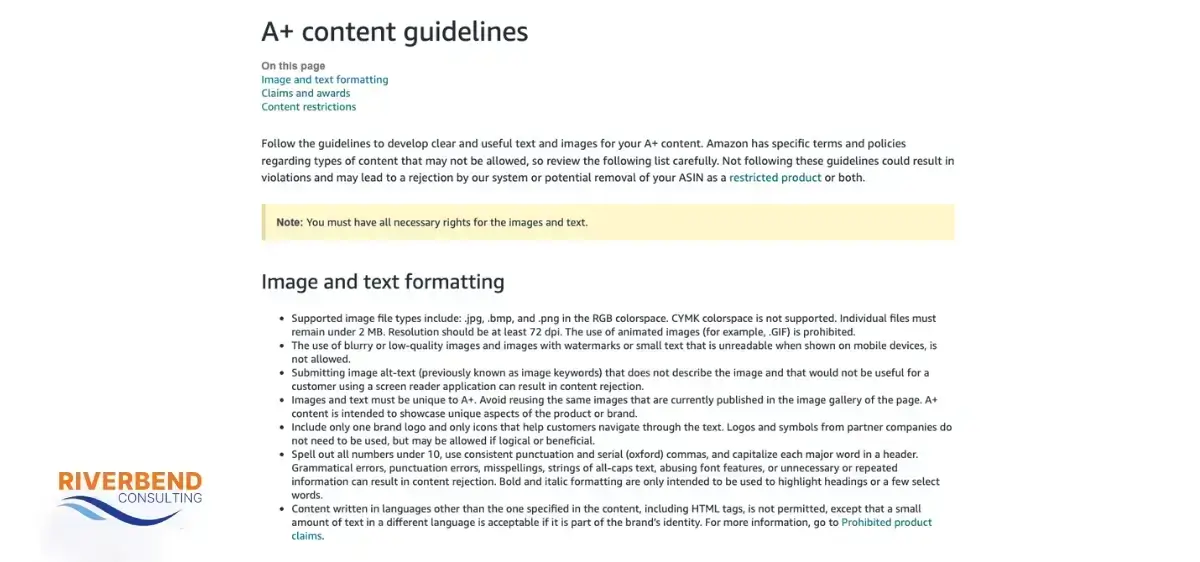
Before diving into design, it’s critical to understand Amazon’s rules. Amazon A+ Content is reviewed manually by Amazon’s internal teams. Any non-compliant modules will result in rejection. Here are a few must-know A+ guidelines and requirements:
- You must be enrolled in Brand Registry.
- No pricing, promotional language (“free shipping”), or guarantee claims allowed.
- Avoid customer reviews, quotes, or star ratings in any module.
- Do not include any external links or references to other websites.
- Images must meet Amazon’s pixel requirements for each module (typically 970px+ width for full-width modules) and be clear, high-resolution, and zoom-friendly.
- Spelling, grammar and punctuation matter. Amazon will reject content that reads poorly or looks unprofessional.
Amazon updates A+ rules occasionally, so ensure you cross-reference with the latest documentation before submitting.
The top 10 Amazon A+ Content mistakes to avoid
A+ Content is a creative process, but it also requires strategic discipline. Let’s review the nine most common mistakes sellers make when creating A+ Content and how to fix them before they impact your listing.
1. Low-quality images
Poor visuals are the fastest way to undermine your credibility. Blurry, pixelated, or awkwardly cropped images look unprofessional and make shoppers question whether your product is worth the price. Amazon sets minimum resolution standards for a reason. Invest in high-resolution, well-lit, and professionally edited images. Show your product in use, from multiple angles and optimize for clarity and context. Think about lifestyle shots, infographics and product close-ups that help answer customer questions.
2. Too much text, not enough clarity
Customers aren’t looking to read a novel. Large blocks of text may seem informative, but they drive people away. A+ Content should feel like a magazine spread rather than a user manual. Break text into digestible chunks, use bullet points and infographics and lean into bold headlines and subheadlines. Copy should highlight benefits, not just features. If a customer has to scroll more than once without learning something new, you’re probably saying too much.
3. Breaking Amazon’s rules
Amazon has strict policies about what you can and can’t say in A+ Content. Phrases like “#1 Best Seller,” “Guaranteed results,” or even “100% safe” can get your submission rejected and put your account at risk. Instead, focus on substantiated claims and benefits. Replace superlatives with specifics.
4. Ignoring mobile optimization
Most shoppers are on mobile. If your A+ Content looks beautiful on desktop but unreadable on a phone, you’re leaving conversions on the table. Amazon does not always automatically optimize formatting for mobile screens. Avoid tiny fonts, overly broad modules, or image-heavy layouts without text support. Always preview your content on both mobile and desktop. Ensure your most important information appears early in the scroll.
5. Using the same layout for every ASIN
Each product has a different customer journey. Yet, many brands fall into the trap of duplicating A+ layouts across all ASINs. That’s a missed opportunity. A supplement might benefit from ingredient breakdowns and comparison charts, while a home decor item could shine with lifestyle imagery and use-case examples. Tailor each layout to specific customer questions and objections.
6. Lack of brand story and consistency
Your A+ Content is an extension of your brand. Inconsistent fonts, clashing color schemes and mixed messaging confuse shoppers and dilute your authority. The design and feel should reflect your brand’s tone, color palette and personality. Create a style guide and stick to it.
7. Skipping the comparison chart and credibility signals
This might be the most underutilized module in the entire A+ suite. The comparison chart is a conversion goldmine if you sell multiple similar products or variations. A comparison chart helps customers pick the best option for their needs and can help increase average order value.
Use product certifications, factual claims, or brand credibility signals (e.g., years in business, product testing standards) instead of customer quotes, which are not allowed in A+ Content. Shoppers want reassurance that others have tried, tested and loved your offer.
You must walk a fine line when incorporating comparison charts and social proof. Don’t turn this section into a billboard of bold claims and unsubstantiated promises. Phrases like “guaranteed results,” “best on Amazon,” or “#1 seller” are all against Amazon’s guidelines and are common triggers for rejection. Instead, stick to factual, benefit-driven language.
8. Forgetting to address customer questions
It’s easy to get caught up in telling your brand story or listing features. But the best A+ Content is built around the customer’s real-world concerns. What are they afraid of? What objections do they have? What makes them hesitate? Address customer questions by reviewing your competitors’ questions and answers sections, so long as your product is similar. Stick to what’s relevant to your product and demonstrate how your product fits into their life, solves their problem, and simplifies tasks.
9. Publishing without proofing
Yes, typos matter. Spelling mistakes, broken image links and mismatched modules are red flags. Proofread every module. Check your grammar, ensure the formatting is clean and verify that all images display correctly. Once your content goes live, don’t forget to test it on multiple browsers and devices. You get one chance to make a first impression and sloppiness is never worth the risk.
10. Using generic or AI-generated content without customization
AI tools can speed up content creation, but relying on generic, templated copy can hurt your performance. Amazon is becoming more sensitive to low-quality or repetitive content that doesn’t clearly differentiate your product or brand.
Your A+ Content should feel unique, product-specific, and aligned with your brand voice. Avoid copying and pasting generic descriptions or reusing the same structure across multiple listings without customization. Focus on clarity, originality, and real value for the customer.
Common Amazon A+ Content upload issues
Even when your content is perfect, the upload process can be challenging. Amazon’s interface isn’t exactly known for its user-friendliness. Glitches are not uncommon. Some common headaches include:
- Images not saving properly or disappearing after upload.
- Modules not loading due to browser incompatibility or Amazon bugs.
- HTML errors when copying from Word or rich-text editors.
- Delayed approval times, especially during peak seasons.
A+ Content may be temporarily suppressed after major catalog changes (title, brand, or category updates), requiring reapproval.
Best practice? Use Google Chrome, clear your cache often and save your content in a separate file. Never rely on Amazon’s platform alone to store your designs. Enlist the help of Amazon problem solving experts if the issue persists.
Common reasons your ASINs can’t be added to your A+ Content
Sometimes, everything appears ready to go, but Amazon won’t let you add your ASIN. Don’t panic. A few things can cause this issue:
- Brand Registry not linked properly: Your ASIN must be listed under your brand, even if enrolled. Use Brand Registry support to reassign ownership if needed.
- Retail contributions or conflicts: If your ASIN has been edited by a retail vendor or another seller, Amazon may block A+ Content edits. A flat file or support case can help resolve this.
- Incorrect ASIN type: A+ Content can only be applied to parent ASINs or standalone ASINs, not child ASINs without standalone eligibility.
- Newly created listings: Sometimes it takes 24-48 hours after listing creation for the ASIN to be eligible for A+ Content. Wait, then try again.
If the issue persists, submit a case to Amazon Seller Support. Be specific and include screenshots. The more precise you are, the quicker the resolution. If your ASIN was previously restricted, you may need to perform an Amazon ASIN appeal.
Keep your Amazon A+ Content working for you
Here’s the secret to Amazon A+ Content: it’s never really finished. Amazon shoppers evolve. So should your visuals and messaging. Treat A+ Content as a living asset that can be tested, improved and refreshed over time.
If you’ve made any of the mistakes above, don’t stress. With extra attention to detail and a deep understanding of what Amazon expects, you can create brand experiences that move the needle.
And if you hit a wall? That’s where Riverbend Consulting comes in. We’ve helped thousands of sellers reinstate their ASINs after rejections or policy issues. If you need help with a sudden Amazon account suspension or you’re suddenly dealing with a listing takedown, our team can help with your Amazon appeal. Contact us today to get started.
Seller Account Health. Solved.
Frequently Asked Questions