
If you’re an Amazon seller fulfilling orders yourself, there’s one metric you can’t afford to ignore: your Amazon On-Time Delivery Rate (OTDR). It might not get as much attention as the Order Defect Rate (ODR) or late shipment rate, but let me tell you, if you’re not meeting Amazon’s expectations for delivery timeliness, you’re on thin ice.
At Riverbend Consulting, we’ve seen too many sellers blindsided by warnings or suspensions related to OTDR. And here’s the kicker: many sellers didn’t realize their performance had slipped until it was too late. This blog will walk you through what OTDR is, how it impacts your account, and most importantly, how to keep it above Amazon’s thresholds.
What is the Amazon On-Time Delivery Rate (OTDR)?
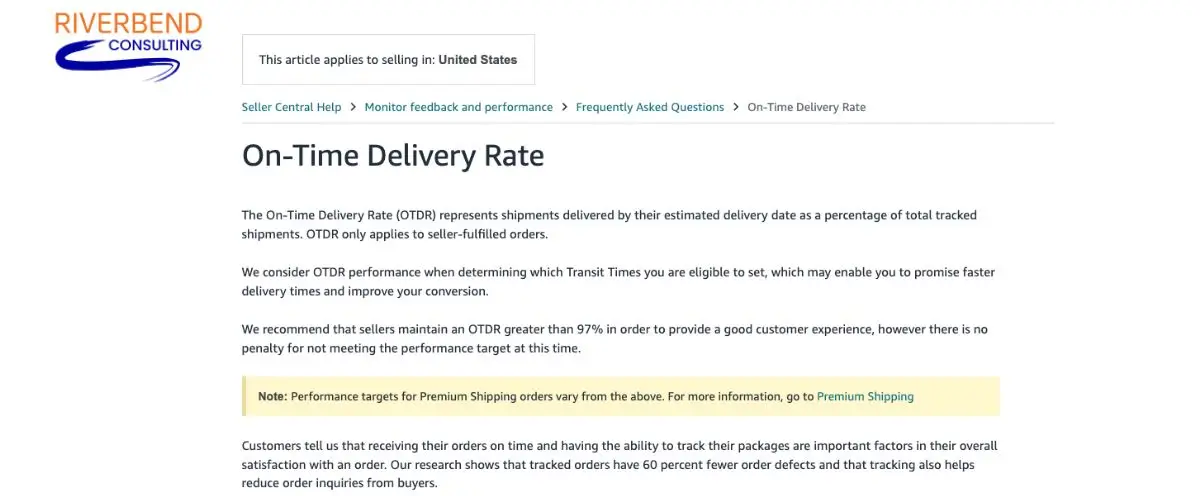
Amazon’s On-Time Delivery Rate (OTDR) is the percentage of your seller-fulfilled orders that are delivered to buyers by the estimated delivery date. It’s calculated based on tracking information from carriers and only applies to seller-fulfilled orders, not FBA.
If you think of OTDR like a credit score, it’s all about trust. Amazon wants to ensure that customers get their packages when they expect them. If your shipments are consistently arriving late, that trust erodes and so does your seller reputation.
Amazon tracks OTDR on both a 7-day and 30-day rolling basis. If your rate drops too low, it can put your account under scrutiny or even at risk of suspension.
How can the OTDR affect your seller metrics?
Low OTDR can cascade into bigger problems that damage your account health. Unfortunately, it’s too easy to brush off a few late deliveries as isolated incidents. When your On-Time Delivery Rate starts to slip, the consequences stack and they don’t stop at just one metric. A low OTDR acts like a slow leak in your account health. At first, you might not notice anything significant. But over time, it can quietly chip away at your performance standing, triggering warnings, hurting customer trust and putting your seller account at risk.
Amazon’s performance system is interconnected. OTDR feeds into broader issues, like order defect rate, customer feedback and Buy Box eligibility. One late delivery might seem harmless, but repeat offenses add up quickly. Before you know it, you’re dealing with a performance notification, or worse, an Amazon account suspension that could have been avoided with a few small tweaks to your shipping process.

Note:Amazon states that account suspensions due to low OTDR are not common, but other factors affecting account health or performance can still leave your account at risk.
Let’s break down exactly how OTDR influences your overall metrics and what that domino effect can look like.
- Poor customer experience: When packages arrive late, buyers file A-to-Z Guarantee claims or leave negative feedback, your OTDR can take a hit.
- Account health warnings: Amazon may issue warnings or performance notifications, especially if your OTDR dips below 97%.
- Buy Box suppression: Even if your pricing and feedback are solid, Amazon may suppress your Buy Box eligibility if delivery performance is lacking.
- Suspension risk: Repeated OTDR failures without taking corrective action can lead to temporary account suspensions.
Think of OTDR as a silent killer. It doesn’t cause drama until it’s too late.
OTDR policy updates
Amazon’s expectations for delivery performance have become stricter since the pandemic. Previously, minor delays might have gone unnoticed. But with rising customer expectations and Prime-like standards for all sellers, Amazon now scrutinizes seller-fulfilled performance more than ever.
As of 2024, sellers are expected to maintain an OTDR of at least 90%. Anything below that may trigger a warning. Amazon has also improved its tracking systems, meaning your OTDR score now reflects actual carrier scans, not just what you enter into Seller Central.
So if you’re relying on a carrier that doesn’t scan promptly or accurately, that could cost you.
Step by step: How to calculate your OTDR
Yes, Amazon tracks your On-Time Delivery Rate (OTDR) for you, but relying solely on their dashboard without understanding the math behind it can be risky. If you want to stay ahead of performance warnings and catch small issues before they snowball, it pays to know exactly how this metric is calculated.
When sellers understand how OTDR is measured, they can identify patterns, spot gaps in carrier performance and make smarter operational decisions. It also makes you more proactive, because let’s face it, the last thing you want is for a surprise metric dip to catch you off guard right before a critical sales season.
Here’s a simple breakdown of how Amazon gets that percentage, so you can take control of your shipping performance before it impacts your account health
Step 1 Go to your metrics: Log in to your Amazon Seller Central account. Go to your Performance > Account Health dashboard in Seller Central. Locate the On-Time Delivery metric.
Step 2 Understand the timeframes: You’ll see the rate for both 7 and 30-day periods. Focus on the 30-day view for a broader picture. Note: Amazon uses a 14-day evaluation window with a 7-day buffer. That means they’re only counting deliveries that were due at least a week ago. Why? Because they give orders time to arrive before measuring performance. So if you’re trying to track OTDR manually, keep this lag in mind.
Step 3 Count your total seller-fulfilled orders: Many assume OTDR is calculated per order. It’s not. One late item in a multi-unit order can hurt your rate even if everything else arrived on time.
Step 4 Verify your Amazon on-time deliveries: Count how many orders were delivered on or before the promised delivery date. A valid tracking number must confirm this.
Step 5 Use the formula: Now that you have your totals, here’s how the calculation works:
OTDR = (On-Time Deliveries ÷ Total Units with Confirmed Tracking) × 100
Example: Let’s say you shipped 100 units in the past 30 days. If 90 were delivered by the original “Deliver By” date with valid tracking, your OTDR is:
OTDR = (90 ÷ 100) × 100 = 90%
That’s right on the minimum threshold. You’re still compliant, but just barely. If even a few more shipments slip, you could dip below Amazon’s required 90%, which puts your seller-fulfilled listings at risk.
How to Improve your OTDR
Improving your Amazon On-Time Delivery Rate is about working smarter. Here are actionable steps you can take:
- Choose reliable carriers: Cheap carriers may save you a few bucks, but if they don’t scan shipments promptly or deliver on time, your OTDR pays the price. Use services like UPS, FedEx, or USPS Priority that provide consistent tracking.
- Build in buffer time: Don’t promise 2-day delivery if you can barely manage 3. Underpromise and overdeliver. Add one extra day to your handling or transit times if needed.
- Ship same-day or next-day when possible: The faster you get it out the door, the more time you have to absorb delays without missing the delivery window.
- Print labels through Amazon: Shipping through Buy Shipping ensures tracking info is integrated and automatically confirmed. This eliminates errors or delays caused by third-party shipping tools.
- Track your metrics daily: Waiting until the end of the month to check your OTDR is like checking your parachute after you’ve jumped out of the plane. Set a daily habit of reviewing tracking statuses.
- Keep your inventory in check:Avoid backorders and fulfillment delays by syncing your inventory levels across platforms. Use inventory management software if needed.
- Communicate proactively: If there’s an unavoidable delay (weather, supply issues), message your buyer before the estimated delivery date. While it won’t always fix your OTDR, it can reduce negative feedback.
How to Build an Internal OTDR Response SOP
When it comes to Amazon’s On-Time Delivery Rate, most sellers don’t get in trouble because they’re reckless. They get in trouble because they’re reactive.
A few late deliveries turn into a pattern. The pattern turns into a performance notification. Before you know it, Amazon is asking for an Amazon POA (Plan of Action) to explain what went wrong and how you’ll fix it. That’s not a good time to start figuring out your internal processes.
Instead, smart sellers build a simple OTDR response SOP (Standard Operating Procedure) ahead of time. Think of it as an Amazon problem solving approach to help you create a clear action plan before Amazon ever knocks on your door.
Your weekly OTDR check-in framework
Here’s how to structure a weekly rhythm that keeps you on track:
1. Pull your 30-day OTDR report
- Go to Seller Central > Performance > Account Health
- Focus on the 30-day view (it gives a clearer trend line)
- Note any drops, even minor ones
2. Flag late deliveries
- Use Amazon’s delivery report or your own tracking dashboard
- Highlight any deliveries marked “late” by Amazon, even if you believethey arrived on time
3. Identify the root cause
Ask yourself:
- Was the shipping carrier delayed?
- Was tracking uploaded late?
- Was the handling time too aggressive for your workflow?
- Did weather or operational issues play a role?
Keep a shared spreadsheet with notes. Patterns will emerge.
4. Create a fast-action fix
For each issue type, document a fix. For example:
- Carrier delays? Switch to one with faster scan times.
- Late uploads?Use Buy Shipping or automate label printing.
- Handling time too tight?Add a one-day buffer.
5. Assign accountability
Designate a team member to perform weekly OTDR checks. If you’re a solo seller, set a reminder every Friday to complete this process.<
6. Document everything
If you ever receive a policy warning or performance notification, this log becomes the backbone of your POA. You can clearly show Amazon:
- You monitor performance consistently
- You’ve already taken corrective steps
- You understand what went wrong and how you’ll prevent it moving forward
7. Have a trusted partner on standby
Even with the best internal system, things can still slip. Carriers miss scans. Systems glitch. Amazon misreads a delivery timeline. That’s why smart sellers have a go-to service provider they trust – someone who knows Amazon policy inside and out and can step in quickly when issues escalate.
Whether it’s helping you respond to a warning or writing a strong Amazon Plan of Action (POA), working with an experienced consultant takes the pressure off your shoulders.
The best time to build that relationship? Before you need it. Keep that contact handy so you’re ready if Amazon sends you a notification.
Don’t let OTDR become a silent business risk
OTDR might not feel as urgent as product reviews or ad spend, but it quietly influences your entire Amazon performance ecosystem.
If you’re shipping late, even occasionally, you’re sending the wrong signal to Amazon. Worse, you’re eroding customer satisfaction and trust. But with the right processes and tools, staying compliant is doable.
At Riverbend Consulting, we help sellers identify silent killers like OTDR issues before they become full-blown account disasters. Don’t wait until Amazon sends a warning. Be proactive. Monitor your delivery metrics, streamline your operations and lean into support when you need it.
Seller Account Health. Solved.
Frequently Asked Questions
Q: What is the On-Time Delivery Rate (OTDR) on Amazon?
A: OTDR measures the percentage of seller-fulfilled orders delivered by the promised date based on valid tracking information. It’s a key performance indicator for shipping reliability.
Q: How does Amazon’s OTDR policy affect seller-fulfilled products?
A: It applies only to seller-fulfilled orders and reflects your ability to deliver on your shipping promises. Poor performance can impact Buy Box eligibility and account health.
Q: What is the minimum OTDR requirement for Amazon sellers?
A: Amazon requires a minimum OTDR of 90% over a rolling 30-day period.
Q; How can sellers improve their OTDR to meet Amazon’s standards?
A:Use reliable carriers, print labels through Amazon and manage shipping expectations by building in buffer time.
Q: Why is maintaining a high OTDR important for Amazon sellers?
A: It directly impacts customer satisfaction, account health and your chances of winning the Buy Box.
Q:What are the consequences of failing to meet Amazon’s OTDR requirements?
A: You may receive warnings, have your Buy Box suppressed, or risk Amazon account suspension.
Q: How does OTDR impact Amazon seller account health?
A:It contributes to your overall shipping performance, which is closely tied to account health evaluations.
Q: What tools does Amazon provide to help sellers improve OTDR?
A: Amazon offers the “Buy Shipping” tool, performance dashboards and delivery performance reports in Seller Central.
Q: How does OTDR influence a seller’s ability to win the Buy Box?
A: Late deliveries can lower your shipping performance score, decreasing your chances of being Buy Box eligible.
Q: What is the relationship between OTDR and customer satisfaction on Amazon?
A:Timely deliveries lead to better reviews, fewer claims and more repeat business, all critical for long-term success on Amazon.