
Amazon order management is the system that turns customer clicks into delivered packages and it can make or break your reputation on Amazon. Sellers who get this right build trust, protect their metrics and can position themselves for long-term growth. Minor missteps in timing, accuracy, or communication can lead to negative reviews, harm your account health and jeopardize your selling privileges.
Mastering Amazon order management involves leveraging both process and technology to deliver a seamless customer experience. It’s about staying ahead of problems before they happen. Whether you’re a solo seller shipping from your garage or a brand managing thousands of units in multiple marketplaces, a refined order management system is one of your most valuable business assets.

What is order management in Amazon?
Order management on Amazon is the end-to-end process of receiving, processing and fulfilling customer purchases while keeping every metric in top condition. It’s the framework that ensures each order moves smoothly from the moment it’s placed to the moment it’s in the buyer’s hands. While FBA sellers rely heavily on Amazon’s fulfillment network, they still need to monitor shipments, track performance and resolve customer inquiries actively. FBM sellers take on even more responsibility, handling packing, shipping and tracking themselves, often under tight deadlines.
Order management is about consistency and control. It means having a system that works the same way every time, whether you have 10 orders or 1,000. This involves syncing inventory data, tracking fulfillment timelines and ensuring customers are kept informed at each step. The best sellers treat this process as a critical part of their brand experience, not a back-office chore.
Benefits of Amazon order management
An optimized order management process delivers benefits that go far beyond simply getting packages out the door. First, it safeguards your account health by keeping your on-time shipping rate, order defect rate and tracking validity metrics well within Amazon’s requirements. When you consistently meet or exceed these targets, you reduce the risk of warnings, restrictions, or Amazon account suspensions.
Second, good order management makes scaling much easier. When your process is streamlined, sudden spikes in sales (whether from seasonal demand, promotions, or viral product exposure) are less likely to overwhelm your operation. This ability to absorb growth without chaos is a competitive advantage.
Third, Amazon order management can improve profitability. Efficient systems can reduce errors, lower return rates and minimize wasted labor. Every time you prevent a shipping mistake or a delay, you save money and preserve your reputation. Finally, the customer impact can’t be overstated. Buyers who receive their orders quickly, with accurate tracking and no surprises, are more likely to leave positive feedback, make repeat purchases and recommend your products to others.
Step by step: How does Amazon order management work?
Mastering Amazon order management begins with understanding every step in the customer journey and knowing exactly how Amazon Seller Central tools can help you execute it effectively. For FBM sellers, the process is hands-on from start to finish.
For FBA sellers, it’s more about oversight and proactive problem-solving, but the stakes are just as high. Regardless of your fulfillment method, Amazon expects consistency, speed and accuracy. The Order Management page is where you keep those standards in check.
It’s a system you fine-tune over time to handle growth without sacrificing performance. The right workflow keeps orders moving, customers satisfied and your account health in the green. Below is a complete step-by-step breakdown, along with the Seller Central tools that help you stay in control.
For FBM (Fulfilled by Merchant) sellers:
- Receive order notification: You’ll get an alert in Seller Central under the “Manage Orders” tab.
- Confirm the order promptly: This keeps buyers informed and ensures your commitment to ship on time.
- Print packing slips: Use the Order Details page to generate accurate slips.
- Pick the product from Inventory: Double-check SKU and condition against the order.
- Package securely: Protect items during transit to reduce damage-related returns.
- Purchase shipping labels: Use Amazon Buy Shipping for rate advantages and to ensure that tracking automatically populates.
- Upload tracking: If using an outside carrier, update the tracking in Manage Orders to meet the Valid Tracking Rate requirement.
- Ship within handling time: This is tied to your On-Time Shipment Rate metric; missing it can impact your account health.
For FBA (Fulfilled by Amazon) sellers:
- Inventory oversight: Use the Inventory Dashboard to track stock levels and avoid stockouts that cancel orders.
- Monitor order flow: Although Amazon handles fulfillment, review Order Reports to confirm that shipments are on schedule.
- Address stranded or delayed shipments: Check the Stranded Inventory Report and resolve any listing or ASIN issues.
- Respond to buyer inquiries: Use Buyer-Seller Messaging to maintain customer satisfaction.
- Track performance metrics: Watch the Account Health Dashboard for any fulfillment-related flags.
Key tools inside the Amazon order management workflow
Amazon’s Order Management page serves as your control center for keeping orders on track, resolving issues before they escalate and maintaining customer confidence. Each tool offers visibility, speed and accuracy. The difference between average and top-tier order fulfilment often comes down to how well you leverage these built-in resources. By knowing exactly where to look and how to use these tools, you can minimize errors, safeguard your account health and deliver a seamless buyer experience.
- Order reports: Located under the Reports menu, these downloadable CSV files enable you to review large volumes of orders simultaneously. They’re especially valuable for sellers processing high order counts or managing multiple SKUs, making it easy to track fulfillment timelines, confirm shipments and spot delays early.
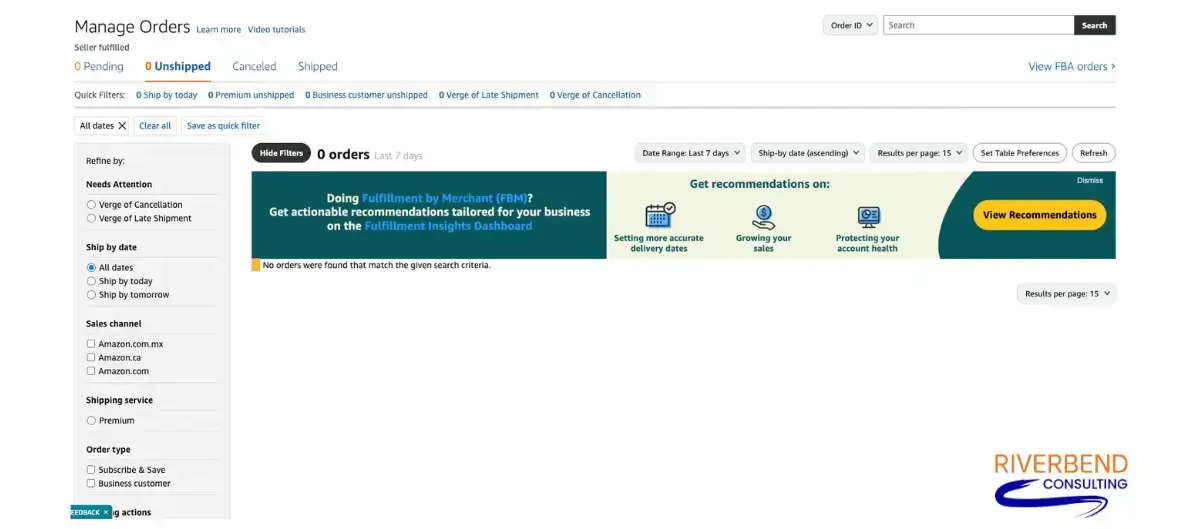
- Order filters: Located on the Manage Orders page, order filters allow you to sort by order status (Unshipped, Pending, Shipped), fulfillment channel (FBA or FBM), or a specific date range. This is essential for prioritizing urgent orders and ensuring nothing slips through the cracks.
- Buyer communication panel: Within each order’s detail view, you can send messages directly to customers. Use this tool to confirm special requests, clarify shipping details, or address post-purchase questions promptly before they escalate into negative feedback.
- Marketplace filters (U.S., Canada, Mexico): This left-navigation tool allows you to view orders by country, helping you manage cross-border shipping timelines, customs requirements and carrier expectations for each marketplace.
- Performance metrics integration: Although not technically part of the Manage Orders page, linking order activity to your Account Health Dashboard enables you to identify trends (such as a rising late shipment rate) and take corrective action before they impact your selling privileges.
- Bulk action options: For FBM sellers, you can confirm multiple orders, print packing slips, or purchase labels in bulk, thereby reducing repetitive manual work.
- Buyer-seller messaging history: Access past conversations tied to an order to keep communication consistent and ensure all customer commitments are met.
When you incorporate these tools into your daily routine, order management can become a well-orchestrated process that scales with your business.
Managing multi-marketplace orders in North America
For sellers operating across the U.S., Canada and Mexico, Amazon order management comes with an extra layer of complexity and opportunity. For sellers operating across the U.S., Canada and Mexico, Amazon order management comes with an extra layer of complexity and opportunity. Through Amazon’s North America Remote Fulfillment (NARF) program, you can reach a broader customer base. Along with that expanded reach comes the challenge of meeting different fulfillment timelines, customs requirements and customer expectations for each marketplace.
For example, a product that ships domestically in the U.S. might reach the customer in two days, but the exact order going to Canada could take longer due to border clearance. In Mexico, extended customs processing and regional carrier coverage can add more time to the process. These differences make it essential to track orders by country, adjust timelines and communicate proactively with customers if delays are anticipated.
This is where Seller Central’s country-specific filters and order segmentation tools become critical. By viewing and managing orders separately for each marketplace, you can ensure you’re meeting the unique service standards that build trust in every region you sell.
What you need to know about the Canada and Mexico filters in Amazon order management
If you sell across multiple North American marketplaces, you’ve likely seen the country filter in the left navigation of your Order Management page. This filter enables you to view your Canadian or Mexican orders separately from your U.S. orders. By organizing orders by country, you can focus on each marketplace’s specific requirements and prevent details from getting lost in a mixed order list.
By filtering orders by country, you can focus on meeting each marketplace’s expectations without getting lost in a blended order feed. For example, a Canadian customer might expect delivery within a specific time frame based on domestic carrier service levels, while a Mexican order could take longer due to customs processing.
Using this tool allows you to prioritize shipments, adjust timelines, and troubleshoot issues before they affect customer satisfaction.
Can improper order management cause Amazon account suspension?
Absolutely. Amazon’s performance metrics exist to ensure buyers receive a consistent, reliable experience. Failing to manage orders properly can, on its own, push key performance metrics outside Amazon’s acceptable thresholds and lead to Amazon account suspension.
For FBM sellers, Amazon now enforces a 90% On-Time Delivery Rate (OTDR) for seller-fulfilled orders, in addition to its long-standing metrics.
- Late Shipment Rate of under 4%
- A Valid Tracking Rate of above 95%
- Order Defect Rate of under 1%
OTDR measures whether packages are delivered on time, not just shipped on schedule. Failing to meet any of these performance targets can trigger enforcement, even in the absence of other issues. Common causes include missed delivery windows, late shipments, invalid tracking uploads, stockouts leading to cancellations, or sending incorrect items. A single recurring order management failure is enough to put your account at risk.
Amazon looks for patterns, not one-off mistakes. A few late orders spread over a year may not cause trouble, but repeated issues within a short timeframe send a clear message that your operation isn’t meeting expectations. For FBM sellers, these issues often stem from manual processes or a lack of backup systems. For FBA sellers, neglecting to monitor inventory can lead to order cancellations, which still count against your performance record.
Once Amazon identifies these continued lapses as a risk to customer trust, account suspension is a potential consequence. And while Amazon account reinstatement is possible, prevention is far easier and less costly than recovery.
Related Content: Amazon Late Shipment Rate: Best Practices for Timely Deliveries
Inventory Management Tips for Better Order Performance
Strong order management starts with strong inventory management. Even the best packing and shipping processes can’t compensate for stockouts, overselling, or sending the wrong product.
On Amazon, inventory gaps can lead to order cancellations, late shipments, or buyer frustration, all of which can negatively impact your performance metrics. The key is to treat inventory control as part of your customer service strategy, not just a back-end function. When you can accurately forecast demand and restock ahead of schedule, you can help protect your ability to fulfill orders on time. That’s a competitive advantage that can keep your account healthy.
Actionable inventory tips:
- Use Amazon’s inventory dashboard: Monitor FBA stock levels daily and resolve any stranded inventory immediately.
- Automated reorder systems: Use software or Amazon’s restock tools to trigger purchase orders before inventory runs low. Set reorder points that include extra buffer stock, helping you to cover supplier production times, transit delays and unexpected spikes in demand without risking a stockout.
Track sell-through rates: Use your sales history to predict seasonal demand spikes before they happen. - Consolidate SKU data: For multi-channel sellers, keep a single source of truth for stock counts to prevent overselling.
- Audit regularly: Physically verify inventory accuracy against your system data to catch discrepancies before they impact orders.
Proactive inventory management can free up your time to focus on growth rather than damage control.
What to do if your account is suspended for order management issues
If you’ve been suspended due to order management issues, the first step is to carefully read Amazon’s suspension notice and identify the exact performance metrics in question. Look for patterns in your order history to determine whether the issue is related to specific products, shipping methods, or operational breakdowns.
Your next move is crafting an Amazon POA (Plan of Action) that follows Amazon’s required structure:
- Root cause: Clearly explain what caused the issues. Avoid blaming customers or Amazon.
- Immediate actions: List the corrective steps you’ve already taken to address the problem.
- Preventive measures: Detail the permanent changes you’re implementing to ensure it won’t happen again.

An Amazon POA should help prove you have the systems in place to meet Amazon’s standards moving forward. Many sellers work with specialists like Riverbend Consulting to create POAs that also help improve their long-term business operations. The goal is not just to get reinstated, but to come back stronger and more prepared.
Position your Amazon business for operational excellence
Amazon order management can help protect your account, fuel your growth and keep customers coming back. By investing in order management optimization, you can set yourself up to scale confidently in a marketplace that rewards speed, accuracy and trust.
Start by reviewing your current systems. Identify weak points, implement automation where possible and train your team to follow clear, repeatable workflows. Monitor your metrics proactively, not reactively, so you can address minor issues before they become account-threatening problems. Every smooth transaction strengthens your brand, boosts your ranking and can help build the kind of reputation that drives repeat sales.
If order management challenges have put your metrics at risk, our team can help you address the root causes, build stronger systems and protect your ability to sell. Contact our Amazon problem solving experts today.
Seller Account Health. Solved.
FAQs
Q: What is Amazon order management?
A: Amazon order management is the process of receiving, processing and fulfilling customer orders while keeping seller performance metrics in good standing.
Q: Why is order management important for Amazon sellers?
A: It helps protect your account health, keeps customers satisfied and can reduce the risk of costly mistakes like late shipments or cancellations.
Q: How does Amazon order management impact customer satisfaction?
A: Accurate, on-time orders create trust and encourage repeat purchases. Any delay or error can lead to negative reviews and fewer future sales.
Q: What are the key steps in the Amazon order management process?
A: Steps include order confirmation, packing, shipping, tracking updates and customer communication. Each must be completed within Amazon’s performance requirements.
Q: Which tools can help optimize Amazon order management?
A: Seller Central offers tools like Manage Orders, Order Reports and marketplace filters for tracking and prioritizing orders.
Q: What are common mistakes to avoid in Amazon order management?
A: Common errors include missing shipping deadlines, uploading invalid tracking and failing to monitor inventory levels. Repeated mistakes can damage account health.
Q: How can inventory management improve order fulfillment efficiency?
A: Accurate inventory levels prevent overselling and stockouts, ensuring every order can be shipped on time. Consistency can improve performance metrics.
Q: What is the difference between FBA and FBM in order management?
A: FBA means Amazon handles picking, packing and shipping, while FBM sellers manage these tasks themselves. Both require monitoring to maintain high performance.
Q: How does demand forecasting affect Amazon order management?
A: Forecasting helps predict sales trends so you can stock the right amount of inventory. This prevents lost sales due to stockouts and storage costs associated with overstocks.
Q: How do I prevent stockouts and overstocks on Amazon?
A: Use sales history, lead times and seasonal patterns to plan inventory levels. Regularly review your restocking strategy to maintain a balanced stock level.
Q: How can I automate order processing on Amazon?
A: Automation software can handle tasks like order confirmation, shipping label creation and tracking uploads. This reduces manual work and minimizes errors.
Q: What are the best practices for managing Amazon returns and refunds?
A: Process returns quickly and issue refunds according to Amazon’s policies. Use return data to identify product or process improvements.
Q: How often should inventory audits be conducted for Amazon sellers?
A: Conduct physical audits at least quarterly to verify system accuracy. High-volume sellers may benefit from monthly checks.
Q: What is Amazon’s Inventory Performance Index (IPI) and how can I improve it?
A: The IPI measures how well you manage inventory in FBA. Improve it by keeping popular items in stock, reducing excess inventory and resolving stranded listings.
Q: How can I use Amazon’s Manage Orders tool effectively?
A: Regularly filter and sort orders by urgency, fulfillment type, or country. This helps keep your workflow organized and can prevent delays.
