
There’s nothing worse than seeing surprise fees hit your account, especially when they were preventable. That’s what can happen when you ignore your Amazon IPI Score (Inventory Performance Index). Amazon may not shout it from the rooftops, but if your IPI dips too low, they’ll quietly punish you with storage limits, extra fees, and restricted restocks.
We hear from sellers all the time who are blindsided. One day, they send in inventory as usual; the next, they’re stuck with capped space and penalties they didn’t see coming. If you’re unsure what your score means, how it’s calculated, or how to fix it fast, keep reading.
What is the Amazon IPI Score and why should you care?

You won’t get far on Amazon if your inventory isn’t under control. That’s why the Inventory Performance Index (IPI) exists. It’s Amazon’s way of measuring how well you manage stock across your FBA catalog. And here’s the part most sellers overlook. A poor IPI score can result in higher storage fees and limited inventory space.
Amazon assigns each FBA seller an IPI score between 0 and 1000, but it does not explain exactly how this score is calculated. What we do know is that it’s based on a mix of how quickly you move inventory, how well you keep stock available, and how much excess product is sitting around collecting dust.
If your score falls below Amazon’s minimum threshold, typically 400, though it can vary by quarter, you risk losing access to unlimited storage and facing monthly overage fees. These aren’t minor charges. They come straight out of your FBA revenue. And once limits are in place, they’re tough to reverse.
Where to find your Amazon IPI Score in Seller Central
Many sellers don’t realize they have an IPI problem until the damage is already done. The score isn’t prominently displayed on your dashboard, and Amazon doesn’t exactly go out of its way to warn you before fees or restrictions take effect. That’s why it’s critical to know where to find your IPI and check it regularly. Think of it like a check engine light for your FBA account: ignore it too long and you’re in trouble.
While Amazon updates the score weekly, sudden changes can still catch you off guard. So don’t wait for a surprise limit to tell you something’s off. Here’s how to check your IPI score before it costs you.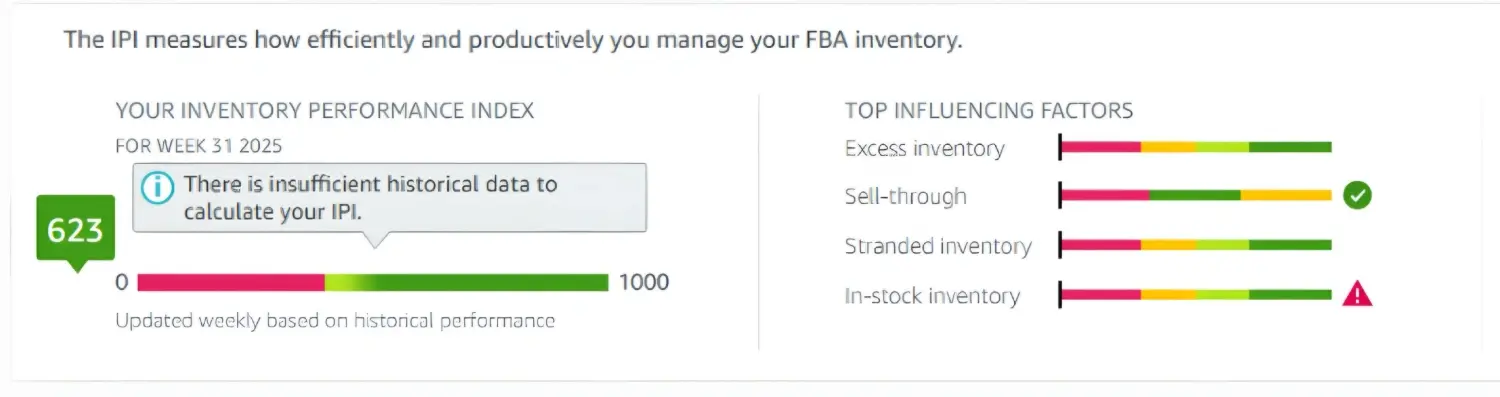
- Log in to Amazon Seller Central.
- Navigate to the “Inventory” tab on the top menu.
- From the dropdown, click “Inventory Planning”.
- You’ll be taken to the FBA Dashboard. Your IPI score is displayed at the top left.
- Click on the score to view a breakdown of key influencing metrics like excess inventory, sell-through rate, stranded inventory, and in-stock rate.
If you don’t see the IPI score, it could mean you’re not enrolled in FBA or haven’t hit the volume needed to trigger score tracking. But if you’re selling through FBA and haven’t looked at this number in weeks? You’re flying blind.
How does Amazon calculate your IPI score?
Amazon doesn’t reveal its complete formula, but we’ve worked with hundreds of sellers and seen what matters most. Your Amazon IPI score is primarily driven by four key areas:
- Excess Inventory: Products that aren’t selling and just taking up space. Amazon penalizes slow-movers.
- Sell-Through Rate: How quickly you’re turning inventory over. The faster you move units, the better your score.
- Stranded Inventory: Units that are in FBA but not connected to an active listing. These are dead weight.
- In-Stock Rate: Amazon wants to see that you keep your bestsellers consistently available, without going out of stock.
If any one of those areas is off, your IPI score can take a hit. And once your score drops, it doesn’t bounce back overnight.
What happens if your IPI score drops too low?
Amazon typically evaluates IPI scores quarterly, but in some cases, they may assess bi-weekly to determine storage limits. If your score falls under the threshold during one of those checkpoints, you could face:
- Reduced FBA storage space
- Additional overage storage fees
- Blocked restock limits for certain ASINs
- Strained cash flow due to inventory constraints
Even if your sales are strong, a few bad inventory decisions can trigger restrictions. We’ve seen sellers with solid revenue numbers suddenly get capped, all because they didn’t clear out dead stock or fix stranded listings in time.
Why does my IPI Score drop without warning?
We’ve worked with sellers who were doing everything right, from inventory moving steadily to resolving stranded SKUs and clearing excess units, only to log in and see their IPI score take a nosedive. No changes on their end. No alerts. Just a sharp drop with no clear explanation. And when the score dips low enough, the consequences follow fast.
You might suddenly lose the ability to send in more inventory. Or your storage space could shrink overnight, forcing you to liquidate or pay Amazon’s overage fees. We’ve seen sellers with thriving product lines get capped out, not because of poor sales, but because they didn’t clear out old inventory fast enough or left one backend detail unresolved.
If this has happened to you, you’re not alone. We’ve seen more volatility in IPI scores than ever before. Sellers report drops of 30, 50, even 100 points in a matter of days with no apparent cause. Amazon insists the IPI reflects core inventory metrics, but what’s really happening behind the scenes isn’t always visible to sellers.
Sometimes, Amazon’s internal systems lag. Other times, quiet algorithm changes shift how metrics are weighted — and the seller is the last to know.
Here’s what we recommend if your score tanks without a clear reason:
- Keep records of everything, including inventory snapshots, restock reports, and performance history.
- Reach out to Account Health and Seller Support; the two departments rarely talk, but they’re both necessary.
- Don’t settle for copy-paste responses. Request escalation and continue pressing until you find a case owner who will conduct a thorough investigation.
Amazon may not offer clarity, but that doesn’t mean you’re powerless. If the IPI system turns against you unfairly, you need to act quickly and seek help if necessary, as waiting it out rarely solves the problem.
What most sellers get wrong about IPI
Too many sellers treat their Amazon IPI score like a background number, something to glance at every few months. But by then, it’s often too late to fix. What we see time and again is sellers with great products and decent margins who get blindsided by storage limits and fees because they ignored early warning signs.
If Amazon limits your storage, it can slow your product launches, restrict your restock flexibility, and put you behind during key sales periods like Prime Day or Q4.
How to improve your Amazon IPI Score fast
A slipping IPI score doesn’t mean all hope is lost, but it is a warning. If you’re getting too close to Amazon’s cutoff, this is your sign to act quickly and strategically. Sellers who wait too long or apply surface-level fixes often find themselves boxed in with inventory they can’t send, rising fees they didn’t expect, and zero room to grow.
The good news? Your score can improve if you focus on the right areas of inventory management. Here’s what to do now to protect your storage limits and avoid preventable FBA costs:
1. Fix stranded inventory immediately
Every unit without an active offer is dragging you down. Go into your Manage Inventory dashboard and resolve stranded SKUs. If the listing’s inactive, either reactivate it, merge it, or create a removal order.
2. Improve your sell-through rate
Look at your Units Sold / Inventory Available over the last 90 days. If the number’s low, it’s time to run targeted promotions, adjust your price, or create a limited-time bundle. Moving inventory is better than letting it sit.
3. Clear excess inventory
Amazon tags products as “excess” when you’ve got more than a 90-day supply based on current sales. If something isn’t moving, consider a sale, removal order, or liquidation, even if it means incurring a loss. Paying long-term storage fees is worse.
4. Restock top performers
Running out of stock on a high-performing SKU hurts twice: you lose sales and your Amazon IPI score drops. Use the Restock Inventory Report to keep your top ASINs available. Forecast conservatively if you’re working with a tight budget.
5. Track weekly changes
Don’t just check your score once a quarter. Review it weekly to spot trends and make adjustments before Amazon intervenes. Quick fixes often come too late when limits are hit.
Don’t treat IPI improvement like a one-time fix. The sellers who bounce back fastest are those who develop better habits. A steady, proactive approach will do more for your account than any last-minute scramble ever could.
Can a low IPI Score trigger an Amazon account suspension?
A low IPI score alone won’t usually suspend your account, but it can put you on thin ice if you’re already dealing with other issues.
We’ve worked with sellers who assumed IPI only impacted FBA storage. However, when paired with factors such as poor customer metrics, shipment issues, or unresolved stranded inventory, it can push your account into “at-risk” territory. Amazon’s systems don’t always treat these metrics in isolation. If you’re underperforming across multiple areas, even slightly, the platform may flag you as a high-risk seller.
So no, IPI doesn’t flip the Amazon account suspension switch on its own. However, it is evident in Account Health reviews, and it can prompt faster enforcement if other warning signs are also present. Don’t let it quietly drag down your standing while you focus on “bigger” issues.
What to do if you’re penalized for a low IPI score
Amazon won’t send you a warning email that says, “Your IPI score is hurting your account.” Instead, you’ll start noticing indirect consequences, like restock limits, unexpected overage charges, or even ASIN suppression if inventory isn’t moving.
If your IPI score has dipped and you’ve already received notice of storage restrictions or listing actions, here’s what we recommend:
- Document your current metrics: Pull reports for in-stock rates, stranded SKUs, and sell-through history.
- Open a case with Account Health, not just regular Seller Support. Escalate if responses are vague or contradictory.
- Request a manual review if your performance doesn’t match the penalties you’re seeing.
- Fix what you can fast: Even while waiting on Amazon, clean up stranded listings, remove dead inventory, and restock smart.
And if you’re still stuck in the penalty loop with no clear path out? Riverbend’s team can help escalate these issues and push for a resolution, especially when the IPI penalties don’t match your actual performance.
IPI score: When to ask for help?
If your Amazon IPI score has been trending down and you’ve already cleared stranded inventory, moved stale products, and restocked bestsellers, and your score still isn’t budging, something deeper may be at play.
You could be dealing with suppressed listings, broken parent/child variations, or even Amazon miscalculations on sell-through metrics. We’ve helped sellers uncover backend issues Amazon support didn’t even flag.
Riverbend Consulting works directly with sellers to uncover root causes, escalate stuck cases, and recover from costly inventory mistakes before they impact your account health. Whether it’s a one-time cleanup or ongoing support, we know what works and what doesn’t.
Amazon IPI Score isn’t just a number; it’s a warning light
Your Amazon IPI score is Amazon’s way of indicating whether your inventory strategy is benefiting or harming your account. If you’re brushing it off, you may be sitting on unnecessary fees, slower growth, and future headaches.
But the good news? Your Amazon IPI score is one of the few areas where you still have some control. Make smart moves now, and if you’re stuck or unsure what’s holding your score down, don’t spin your wheels. Let Riverbend’s Amazon problem-solving team step in and take a deeper look.
Because missed sales and preventable fees shouldn’t be the cost of doing business.
Seller Account Health. Solved.
FAQs
Q: What is Amazon’s IPI score?
A: The Inventory Performance Index (IPI) is Amazon’s internal rating of how well you manage your FBA inventory. It reflects everything from how fast you move products to how much unsellable stock is sitting in a warehouse.
Q: Why is the Amazon IPI score important for FBA sellers?
A: A low IPI score can lead to storage limits and expensive overage fees. A healthy score means more room to grow and fewer surprise penalties.
Q: How is the Amazon IPI score calculated?
A: Amazon doesn’t reveal the exact formula, but we know it’s based on excess inventory, sell-through rate, stranded inventory, and in-stock performance.
Q: What is a good IPI score on Amazon?
A: Generally, a score above 400 is considered safe. Higher scores give you more flexibility and help avoid capacity limits.
Q: What consequences arise from a low IPI score?
A: You may face reduced FBA storage space, overage fees, and restrictions on how much inventory you can send in. In some cases, it can also limit your ability to scale.
Q: How does the IPI score affect storage limits and fees?
A: Amazon uses your IPI score to decide how much space you can use in their warehouses. If you go over that limit, you’ll be charged steep monthly fees per cubic foot.
Q: What are the main metrics that make up the Amazon IPI score?
A: The four key factors are: excess inventory, sell-through rate, stranded inventory, and in-stock rate. Keeping all four in good standing helps maintain a stable score.
Q: How often does Amazon update the IPI score?
A: Amazon updates the score once per week, typically on Mondays. Changes may lag behind real-time performance by a few days.
Q: What tools can sellers use to track and improve their IPI score?
A: You can monitor your IPI in the FBA Inventory Dashboard within Seller Central. Reports like the Restock Inventory Report and the Manage Excess Inventory tool are also helpful.
Q: How do I reduce excess inventory to improve my IPI score?
A: Use price drops, coupons, or removal orders to move old or slow-selling inventory. Avoid reordering products that aren’t moving.
Q: What is stranded inventory, and how do I fix it?
A: Stranded inventory is a product that’s sitting in FBA without an active listing. Reconnect the listing or create a removal order to fix the issue.
Q: How can I increase my sell-through rate effectively?
A: Bundling, promotions, and targeted pricing strategies can help move inventory faster. You can also reduce inbound shipments to avoid flooding the warehouse.
Q: How do restock limits work with the IPI score?
A: When your IPI drops too low, Amazon may cap how many units you can send for certain ASINs. Limits reset based on your performance and space availability.