If you’re an Amazon seller trying to recover money you’re rightfully owed, chances are you’ve heard the term IDR. Maybe you’ve seen the portal pop up in Seller Central, or you’re wondering why your usual reimbursement process suddenly looks different. Either way, it’s time to get clear on what the Amazon IDR Portal means for your business.
Like many recent Amazon changes, the IDR portal was rolled out quietly, but its impact is anything but small. On one hand, it offers more visibility into reimbursement claims. On the other hand, it’s another system you must navigate (on top of FBA fee changes, policy shifts and performance metrics that feel like a moving target).

What is IDR in Amazon?
The Inventory and Defect Reimbursement Portal is a tool Amazon created to help you submit, track and manage reimbursement claims more clearly. The portal is Amazon’s attempt to centralize reimbursements for:
- Lost or damaged inventory
- Shipment discrepancies
- Incorrect fees
- Sourcing cost reconciliation
- And other financial claims
Previously, many of these issues were managed through Case Logs, the “Reimbursements” page under Reports, or manually through Support. The IDR portal is designed to consolidate those touchpoints into a single dashboard.
While the Amazon IDR portal may simplify reimbursement claims, you must understand how to use it. If not, it can add an extra layer of red tape.
Note: Not all marketplaces have fully rolled out the portal. If you haven’t seen it yet, keep checking. Amazon tends to stagger releases by region.
The pros and cons of the Amazon IDR portal
The IDR portal can be a step toward a more structured reimbursement process, but it’s not a cure-all. Like most things in Seller Central, it’s a mixed bag. Here’s a closer look at what the portal is getting right and where it still falls short.
Pros
- More visibility: For years, sellers have been left in the dark about the status of their reimbursement cases. The IDR portal finally gives a centralized view into claim eligibility, status, and outcomes. That means fewer hours digging through case logs or chasing down Amazon support.
- Better organization: With clearly labeled sections like “Eligible for Claim”, “In Progress”, and “Resolved”, sellers can now track the movement of their claims more intuitively.
- Time-saving potential: The IDR portal can reduce the need for back-and-forth messaging with Seller Support. Sellers who understand how to navigate the tool can submit claims with the correct documentation upfront, which may reduce delays.
Cons
- Limited historical data: Although it’s beneficial for claims, the Amazon IDR Portal often fails to retrieve older reimbursement issues. If you’ve had long-standing cases or patterns of losses from Amazon’s fulfillment errors, you might still need to dig through reports manually or work with a third party to find what’s missing.
- Accuracy issues: Just because a claim appears in the portal doesn’t mean it’s accurate. We’ve seen listings with incorrect reimbursement estimates or misclassified issues. Sellers still need to double-check the details before taking action.
- Not truly “automated”: Despite the impression that the portal makes the process easier, it still requires manual effort, especially in uploading invoices, matching SKUs, and following up on delayed payments. It’s more of a guided submission tool than a hands-off system.
- Missing nuances: The portal doesn’t always account for the complexity of specific claims like damaged versus disposal, or lost-in-warehouse inventory. Those more complex scenarios still require escalation and in-depth documentation.
The IDR portal is a helpful starting point, but it is not an all-in-one solution. It provides sellers with more insight and control, but only if you know how to use it strategically. In some cases, it may surface more questions than answers. That’s why many sellers are turning to experts or reimbursement services to make sure no money is left on the table.
How to access the IDR portal step-by-step
Finding the IDR Portal can feel like a scavenger hunt. There’s no big flashy button in your dashboard and unless you already know where to look, you might not even know the Amazon IDR Portal exists. But once you know how to navigate to it, the process is relatively straightforward.
Step 1 Log in to Seller Central: Start by signing into your Amazon Seller Central account. Ensure you’re using the primary account holder’s login, not a secondary user ID, as access to certain features may be restricted.
Step 2 Go to the ‘Reports’ tab: From your main dashboard, hover over or click the Reports tab on the top navigation bar.
Step 3 Select ‘Fulfillment’: This will redirect you to the Fulfillment Reports section, where most of your inventory and reimbursement data lives.
Step 4 Scroll to the ‘Inventory’ section in the sidebar: On the left-hand side, you’ll see a sidebar menu. Look under Inventory and select Reimbursements. Depending on your interface, this may already include a link or reference to IDR-related reports.
Step 5 Click the IDR Portal link (if available): If you’re eligible for the IDR tool, you’ll see a reference or direct link to the Investigate Discrepancy Reimbursements (IDR) portal here. Click into it.
Step 6 Review the claim sections: Inside the portal, you’ll see tabs or pages such as Eligible for Claim, In Progress, Resolved, and others, depending on your case activity. This is where you’ll manage your reimbursements.
Step 7 Bookmark it: Once inside the portal, copy the URL and save it. Amazon doesn’t make this tool easily accessible from the main menu, so having a direct link on hand can save you a lot of time and frustration.
Navigating Amazon’s backend can be anything but intuitive. But once you locate the Amazon IDR Portal, it can become a helpful component of your reimbursement strategy. If you’re unsure whether you’re seeing the whole picture of missing claims, this might be the time to bring in a set of expert eyes.
What are the tabs in the IDR Portal?
The Amazon IDR portal is a multi-tab interface designed to help you track the reimbursement journey. From spotting inventory discrepancies to monitoring the status of your claims, the portal provides you with increased visibility. But many sellers don’t realize how much information is buried inside each tab. And when thousands of dollars in lost inventory are at stake, knowing where to click and what to look for can make all the difference. Here’s a breakdown of the tabs in the IDR portal and what you’ll find in each one.
Eligible for claim
This tab highlights inventory discrepancies that Amazon has flagged as potentially eligible for reimbursement. These are items that were lost, damaged, or mishandled within the FBA network but haven’t been submitted as claims yet.
Key features:
- SKU and FNSKU details
- Facility location
- Event type (e.g., lost, damaged, disposed)
- Date of the event
- Estimated reimbursable amount
Riverbend Tip: Don’t assume every entry is accurate. It’s critical to cross-reference this list with your own inventory reports before submitting a claim. Errors happen.
In progress
Once you’ve submitted a reimbursement request or Amazon has begun reviewing a discrepancy, the case moves into the In Progress tab. This is your real-time claim tracker.
Key features:
- Case ID and submission date
- Status updates (e.g., under review, waiting on documents)
- Links to upload invoices or additional proof
- Expected resolution timeframe (if provided)
Some cases can get stuck in limbo here. If your claim isn’t progressing after several days or weeks, it may require follow-up or escalation.
Resolved
The Resolved tab holds all claims that have been closed—either because they were reimbursed, denied, or otherwise finalized. Think of it as your audit trail.
Key features:
- Resolution outcome (approved, partially approved, denied)
- Reimbursement amount (if applicable)
- Closure reason
- Case history or notes (if any)
Review denied claims carefully. If an item was rejected due to missing documentation or a SKU mismatch, you may be able to resubmit it with updated proof.
Manage sourcing cost
This section allows you to input or adjust the cost of goods sold (COGS) for specific SKUs. Amazon often requires a COGS value to calculate reimbursement amounts accurately.
Key features:
- Manual input for unit costs
- SKU-level COGS data
- Impact on future reimbursements

If you skip this step, you may receive partial or inaccurate inventory reimbursements. Ensure to update your sourcing costs regularly to accurately reflect the actual value of your inventory.
Additional reports or filters (interface-dependent)
Depending on your marketplace and access level, you may see additional filters, CSV download options, or report views that let you segment claims by date, fulfillment center, or reason codes. These Amazon seller tools are valuable for high-volume sellers looking to audit large claim sets.
The IDR portal may not solve every problem, but it’s a huge step up from the maze of outdated reports and disconnected case logs sellers dealt with before. Learning how to use each tab strategically and staying organized with documentation can help you recover more of what Amazon owes and minimize the risk of lost dollars slipping through the cracks.
Why a proven reimbursement service is still to your advantage
If you’ve sold even a few hundred FBA units, you’ve likely lost inventory, been charged extra fees, or had product values miscalculated. The Amazon IDR portal is a start, but it’s not perfect. That’s why partnering with an FBA reimbursement service is a smart business move. Here’s why you can benefit from outside help:
- IDR still requires manual work: You need to monitor, upload, follow up, and resubmit. That’s time you could spend selling.
- Invoice submissions can be tricky: Amazon often rejects files for vague reasons. A good service knows how to package documentation correctly.
- Sourcing cost valuation is everything: Underreported costs = lower reimbursements. Professionals know how to validate your data.
- Amazon moves the goalposts: Reimbursement rules are constantly changing. Reimbursement services stay ahead of those changes so you don’t have to.
Riverbend Consulting works directly with sellers to recover money they’re owed, without the guesswork. Our team understands Amazon’s systems inside and out. From submitting IDR cases to reconciling sourcing costs, we help you get reimbursed faster and with less hassle.
What is an IDR invoice?
If you’ve spent any time in the IDR portal, you’ve probably come across the term “IDR invoice.” And like most Amazon jargon, it sounds more complicated than it is. Despite the official-sounding name, an IDR invoice is your own documentation, typically a commercial invoice or supplier receipt, that proves you sourced the product legitimately and in the specified quantities.
Amazon may request this document when they’re reviewing a reimbursement claim to verify the cost of goods, authenticity, or eligibility. Many sellers are tripped up by missing details, incorrect formatting, or invoices that fail to meet Amazon’s strict criteria. Understanding what an IDR invoice is and how to prepare it properly can be the difference between a fast approval and a frustrating denial. Your IDR Invoice Must Include:
- Supplier name and contact details
- Invoice date and invoice number
- Product name and description (must match your Amazon listing)
- Quantity and unit cost
- Total cost and proof of payment (if available)
Upload your IDR invoice to the “Manage Sourcing Cost” or “Progress” page if Amazon requests it during a claim review. Amazon often rejects invoices that are blurry, cropped, mismatched to ASINs, or missing key details. Use PDFs when possible and ensure the product titles align with what you sell on Amazon.
Amazon IDR portal vs. the old system: What’s changed?
The old reimbursement process could be incredibly painful. Trying to figure out what Amazon owed you meant wading through multiple reports, endless case log threads and vague responses that barely addressed the issue. There was no central view, no clear timeline and no easy way to understand why a claim was approved or denied.
The rollout of the Amazon IDR portal promised something better: clarity, structure and visibility. And in many ways, it delivers on that promise. But like most things on Amazon, it’s not a set-it-and-forget-it solution. The process still requires a watchful eye and consistent follow-up. Here’s a comparison of how things looked before and what’s improved with the system.
Just because the portal is doesn’t mean it’s hands-off. While the user experience is more streamlined, the burden of proof is still on you.
- Amazon doesn’t proactively reimburse in most cases, you still need to submit accurate claims.
- Poor or missing documentation will still lead to denials.
- You need to validate Amazon’s flags for eligibility; the portal can still surface incorrect or incomplete data.
Don’t leave money behind: use IDR strategically
Amazon will not chase you to give you your money back. Even with the portal, it’s up to you to identify problems, gather documentation and follow up until you receive payment. Here’s your checklist to make the most of the IDR portal.
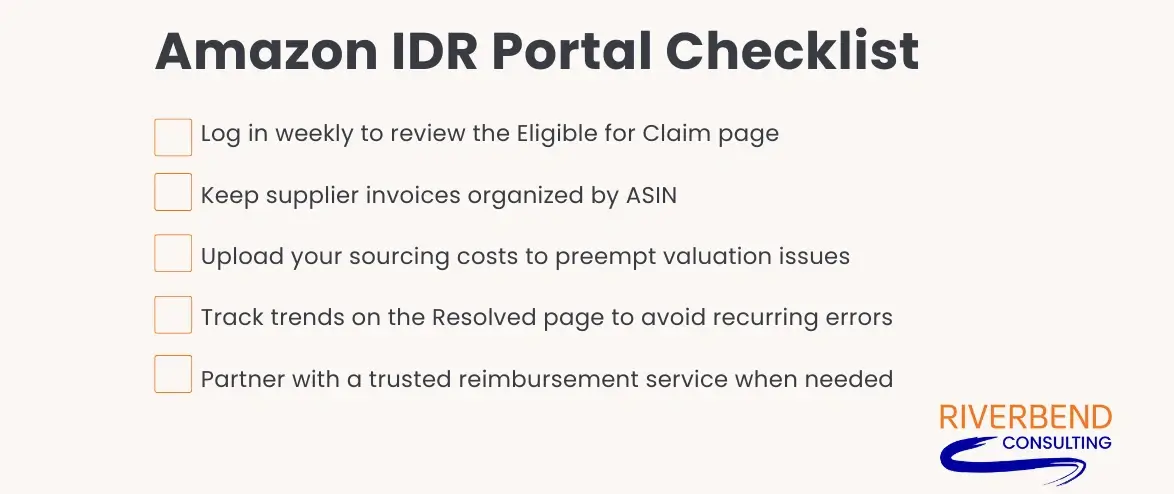
Navigating the IDR Portal is just one more responsibility Amazon has offloaded onto sellers. But instead of treating it like another chore, think of it as a profit recovery opportunity.
If you’re managing thousands of units a month, the money Amazon owes you might surprise you. The IDR Portal isn’t a magic fix, but it’s a tool that, when used well, can protect your bottom line. Don’t wait until your margins shrink to zero. Whether you handle claims yourself or get help, ensure that someone is responsible for this part of your Amazon business.
And if the system still feels like a black hole? Riverbend Consulting is here to guide you through it with real Amazon problem solving solutions, real people and real results Contact Riverbend today to get expert support.
Seller Account Health. Solved.
FAQ
Q: What is the Inventory Defect and Reimbursement (IDR) portal?
A: The IDR portal is Amazon’s centralized tool that helps sellers track, manag and resolve inventory discrepancies that may be eligible for reimbursement. It replaces fragmented reports with a single interface designed to simplify the claims process.
Q: How does the IDR portal help sellers manage inventory defects and reimbursements?
A: It highlights eligible events like lost or damaged items, allows document uploads and shows claim progress in real time.
Q: How can sellers access the IDR portal on Amazon Seller Central?
A: Log into Seller Central, go to the Reports > Fulfillment section, and navigate to the Reimbursements area where the IDR tab appears (if enabled). Bookmark the portal URL once accessed—it’s not easily found from the homepage.
Q: What types of defects does the portal cover?
A: The portal covers inventory lost, damaged, disposed of, or incorrectly processed by Amazon’s fulfillment network. These include warehouse issues, mishandling of returns and shipment discrepancies.
Q: Are all inventory defect types included in the portal?
A: No. Some claims, like inbound shipment shortages or removal order errors, may still require manual review or support case creation outside the portal.
Q: What are the main benefits of using the IDR portal?
A: It can help save time, centralize information and provide more transparency into claim status and outcomes. Sellers no longer need to dig through multiple reports or open repetitive support cases.
Q: Are reimbursements automatic through the IDR portal or require seller action?
A: Most reimbursements still require seller submission, including uploading invoices or COGS. The portal helps guide that process, but doesn’t automate it fully.
Q: Is there a bulk upload feature to manage multiple SKUs simultaneously?
A: Currently, bulk uploads are not universally supported. Sellers must submit claims one at a time unless Amazon enables CSV upload access on their account.
Q: Will the portal eventually support manufacturing cost management?
A: Amazon has hinted at deeper cost tracking, but for now, sellers can only input basic sourcing costs per SKU. Manufacturing cost breakdowns are not currently supported.
Q: How does the portal offer consolidated reporting?
A: It pulls in data that was previously scattered across inventory adjustment reports, reimbursement summaries and case logs. Everything is displayed on a single dashboard with clickable tabs.
Q: Can the portal handle damages, lost inventory and customer returns all in one place?
A: Yes, those three common defect types are included and categorized by event type. This makes it easier to track issues across fulfillment and return workflows.
Q: Are defects related to missing inbound inventory or warehouse removals included?
A: Some are, but not all. These types of defects often fall outside the IDR system and still require traditional case submissions.
Q: What details are provided for each defect in the portal? (e.g., creation date, action taken)
A: Each record includes the SKU, event type, facility, incident date and estimated reimbursement amount. You’ll also see whether a case was submitted and what action Amazon has taken.
Q: How frequently is defect data updated in the portal?
A: Amazon updates the portal regularly, often daily. However, some discrepancies may not appear for several days, depending on internal processing delays.