
We all know working through Seller Support can feel like an uphill battle—especially when you’re stuck in an endless cycle of inventory issues, technical glitches, or listing problems that only Amazon employees seem to have the power to fix.
Ever feel like you’re trapped in a loop of calls, emails, and vague responses that leave you nowhere closer to a solution? You’re not alone. And while Seller Support might leave you frustrated, there is a team that can actually get things moving. Enter the Amazon Captive Team—your secret weapon to finally break through the roadblocks.
What is the Amazon Captive Team?

The Amazon Captive Team is a secret weapon for sellers stuck in the frustrating cycle of Seller Support. Think of them as the higher-level team you didn’t know you needed—the folks with actual authority to make decisions and fix the issues that regular support can’t touch.
While the standard Seller Support reps are great for answering basic questions, the Captive Team deals with the more complex, hair-pulling Amazon seller problems that leave sellers banging their heads against the wall. Whether it’s fixing suppressed listings, solving critical account health issues, or untangling technical errors that seem unsolvable, the Amazon Captive Team can step in where others fall short.
They’re not just reading from scripts—they actually dig into the root cause of your problem and work with internal teams to get things done. If you’ve ever found yourself on the verge of giving up after countless emails and calls, the Amazon Captive Team is the one that can make you feel like you’re finally speaking to someone with real power.
How to contact the Amazon Captive Team
Reaching the Amazon Captive Team isn’t as straightforward as dialing a number or clicking a button—it takes a bit more finesse. The Captive Team is an internal, higher-level support group, so direct access is not offered through normal Seller Central channels. But that doesn’t mean you can’t contact them if you know how to navigate the system.
Step 1: Exhaust Seller Support first
Before reaching the Captive Team, you must go through the motions with Seller Central’s front-line support. It may feel tedious, but you’ve got to document your case thoroughly. This means reaching out multiple times and keeping a record of every email, chat and phone call. The more times you’ve tried to resolve the issue, the better. Amazon needs to see that you’ve made an effort and that standard support isn’t cutting it.
Step 2: Ask for an escalation
Once you’ve gathered enough documentation showing your issue has gone unresolved, start asking for an escalation directly. Be clear and polite but firm. Say something like, “I’ve been dealing with this issue for X days/weeks, and despite my efforts, it remains unresolved. I’d like this case to be escalated to the Captive Team.” Sometimes, just using the word “escalation” is enough to trigger action.
Step 3: Follow up relentlessly
Unfortunately, asking for an escalation once might not get the job done. You’ll likely need to follow up—relentlessly. This means reaching out daily or every couple of days, asking for updates and reiterating that you need the case sent to a higher-level team. Yes, it’s a pain, but persistence often pays off when dealing with Amazon support. You need to make enough noise that they can’t ignore you.
Step 4: Mention the Amazon Captive Team by name
If your case is still stuck in the same old loop, it’s time to drop the Captive Team name. Let the support agent know you’re aware of the team that handles escalations and request that your case be sent directly to them. Sometimes, knowing the team exists is enough to show support you mean business.
Step 5: Executive seller relations as a last resort
If you’ve been banging your head against the wall for too long and mentioning the Amazon Captive Team isn’t getting you anywhere, it’s time to go straight to Executive Seller Relations. This group is a direct line to Amazon’s higher-ups and can often get things moving when everything else fails. You’ll need to be professional and detail every step you’ve taken, but the final push can get your case in front of the Captive Team.
Step 6: Be prepared and patient
Throughout this entire process, keep detailed notes of every interaction. Reference previous conversations, case numbers and responses. The more evidence you show that your issue hasn’t been adequately addressed, the better your chances of getting the attention of the Captive Team. Once your case reaches them, it won’t be an instant fix. The good news? They actually can fix what the regular Seller Central reps can’t. So stay on top of your case, keep following up and don’t let it drop.
Escalating to the Captive Team isn’t always simple, but once you’re there, you’ll finally feel like someone with real power is handling your issue. So, don’t give up—know the steps, push for escalation and get your case in the hands of the team that can make things happen.
Step-by-step: How to request a phone call from Seller Support and the Captive Team

Step 1: Open the Contact Us page: Log into your Seller Central account and go to the Contact Us page. This is where you’ll begin your request.
Step 2: Select the correct issue category: Once on the page, you must specify your problem. Typically, you’ll be presented with two options:
- Selling on Amazon: Select this if your issue concerns selling or listing products.
- Advertising & Stores: Choose this if you have questions about sponsored products, brands, or stores.
Step 3: Pick your specific concern: Amazon will list common issues on the next page. If these don’t cover your problem, select ‘Other Issue’ to ensure you’re guided to the correct type of support.
Step 4: Request phone support: You can now create a case via email, chat, or phone. To do so, select the ‘Phone’ option. This is the quickest route to connecting with someone who can escalate your issue.
Step 5: Enter your information: Once you select phone support, you’ll need to provide your phone number, indicate whether the issue is urgent, and include a brief description of your problem. Be clear and concise—this will help ensure the fastest response.
Step 6: Click ‘Call Me Now’: Clicking the ‘Call Me Now’ button will put you in the queue for a phone call from Amazon Seller Account Support. Make sure you’re prepared—have your Seller Central account open and your account details and billing information ready, as you may need to verify your account.
Step 7: Request to be transferred to the Captive Team: Once you’re speaking to a support representative, be polite but direct—ask for your case to be escalated to the Captive Team. Explain that you’ve attempted to resolve the issue through standard support but require higher-level assistance.
While it might take a few tries and some persistence, requesting phone support is often the quickest way to escalate your case and contact the Captive Team. Be prepared with the necessary information, stay calm, and don’t hesitate to follow up.
What not to do once you reach the Amazon Captive Team
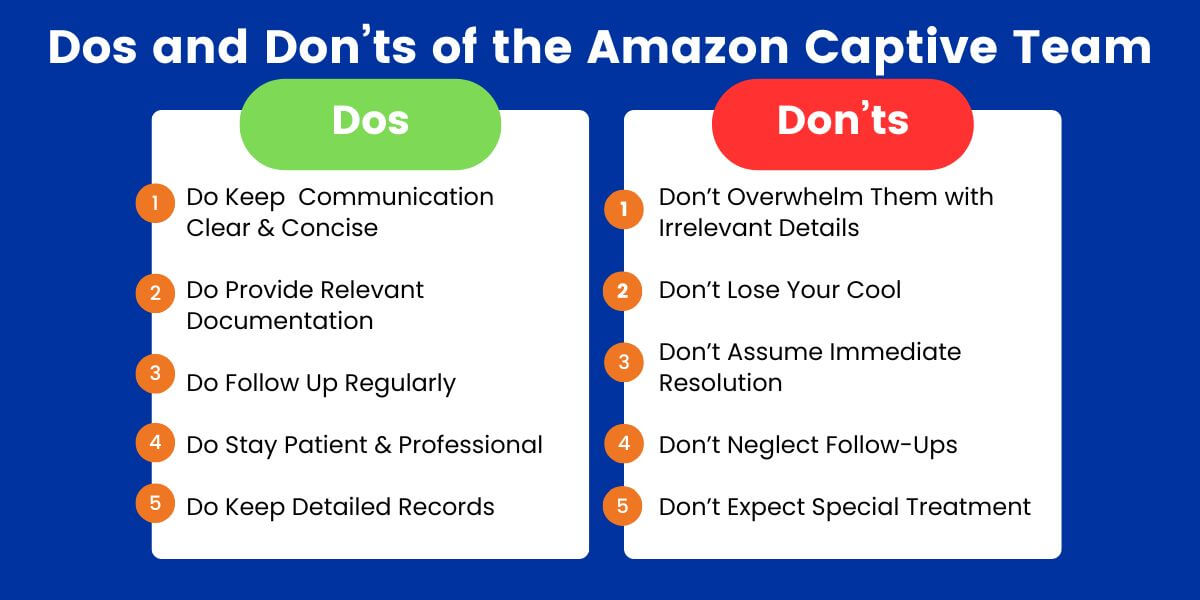
Finally! After all your persistence, you’ve made it to the Amazon Captive Team—the group that can actually resolve your issue. But now that you’re here, handling things right is critical. The Captive Team is your best shot at fixing the problem, so you don’t want to sabotage your chances of success.
- Don’t bombard them with repetitive information: The Amazon Captive Team can access your case history. Repeatedly rehashing the problem won’t speed things up—it will clog communication. Instead, focus on providing new information or responding to their questions clearly and concisely.
- Don’t lose your patience: We know it’s been frustrating. You’ve probably spent days, maybe weeks, dealing with support, and you’re understandably fed up. But venting your frustration on the Captive Team won’t help. They’re there to solve your problem, and maintaining a professional tone will keep the process running smoothly. Stay focused on the goal: getting the issue resolved.
- Don’t demand instant results: The Captive Team deals with complex issues that regular Seller Central support can’t solve. While they’re the right people to handle your case, they still need time to work through it properly. Demanding immediate fixes can strain the relationship and may not even be possible, depending on the nature of your problem. Give them a reasonable timeframe to deliver results.
- Don’t assume they’ll follow up: Just because you’ve reached the Captive Team doesn’t mean you can sit back and relax. While they’re more proactive than front-line support, staying engaged is essential. If you don’t hear back within the timeframe they’ve promised, politely follow up. Don’t assume everything’s moving behind the scenes—stay involved.
- Don’t shortcut the process: Once your case is with the Captive Team, let them do their job. Trying to escalate your case to other teams or external platforms while they’re working on it can disrupt the process. Trust that they have the tools and authority to solve your problem without additional pressure.
- Remember to say thanks. It may sound simple, but showing appreciation goes a long way. If the Captive Team resolves your issue or makes meaningful progress, acknowledge their effort. Remember, they’re people, too, and a little gratitude can foster a more positive relationship, especially if you ever need to deal with them again.
The Amazon Captive Team is your best shot at getting a real solution—but that doesn’t mean you can check out once they’re on board. Stay professional, give them time and keep communication lines open. Handle things well and the Captive Team can be your key to finally overcoming your most tricky Amazon obstacles.
Got complex Amazon issues that just won’t budge? The Riverbend Consulting team specializes in solving the tough-stuff Amazon seller problems that keep your account stuck. Whether it’s Amazon seller account suspensions, listing errors, or navigating Amazon’s labyrinth of policies, we’re here to help. Call us at 877-289-1017 or visit our website for expert guidance today.
Seller Account Health. Solved.