
How to ship inventory to Amazon FBA is one of the fundamental skills every successful Amazon seller must master. Understanding and efficiently managing your FBA shipping process ensures that your products reach Amazon warehouses in optimal condition, are processed quickly, and are available for customers to purchase without delay.
Amazon FBA (Fulfillment by Amazon) allows sellers to tap into Amazon’s powerful logistics network, handling the storage, packing, and shipping of products directly from Amazon warehouses to customers. By navigating the FBA shipping process efficiently, you can ensure your inventory is quickly received and stocked, minimizing the time it takes for your products to become available for sale. This is especially crucial during the fourth quarter and other peak shopping seasons, where delays can mean lost sales. Adhering to proper shipping practices helps protect your seller account by preventing inventory discrepancies that might trigger audits or Amazon seller account suspensions.
How to ship inventory to Amazon FBA?

One common method sellers use to ship inventory is shipping directly from their suppliers to Amazon FBA warehouses. This method can save time and reduce costs since products don’t need to be handled multiple times. However, it requires a high level of trust and coordination with your suppliers. The supplier must understand and comply with Amazon’s shipping requirements, including labeling, packaging, and preparation standards. Failure to do so can result in rejected shipments, lost inventory, or increased fees due to non-compliance.
Some sellers prefer to ship inventory to their own warehouse or a third-party inspection service before sending to Amazon FBA. This method allows you to inspect products to ensure they meet quality standards before they reach Amazon’s warehouses. This step can be especially important if you are dealing with new suppliers or products that have specific quality concerns such as electronics or heath and beauty products.
What is the ‘Send to Amazon’ workflow?
The ‘Send to Amazon’ workflow is a new and improved method that replaces the old FBA shipping workflow, providing a streamlined and efficient way to manage your shipments. The updated process makes it easier for you to ship your inventory to Amazon’s fulfillment centers while ensuring compliance with all necessary guidelines.
Benefits of ‘Send to Amazon’
- Simplified workflow for faster turnaround: The simplified process steps in ‘Send to Amazon’ enable faster turnaround times to help keep your supply chain moving smoothly, reducing the time your products are out of stock and unavailable for purchase.
- Reusable case pack templates: The new templates allow you to save box content information, including weight, dimensions, and prep or labeling details for single-SKU boxes. By using the reusable case pack templates and real-time quantity updates, you reduce the potential for mistakes.
- Efficient packing and shipment updates: The ‘Send to Amazon’ process allows you to pack single-SKU and mixed-SKU boxes before finalizing your shipment. You can update quantities as you pack, ensuring that your shipment details are accurate before you confirm your shipment destinations.
- Flexible shipping options: The new process offers flexibility in how you choose to ship your inventory. Whether you’re sending individual boxes (small parcel delivery) or pallets (less than truckload delivery), ‘Send to Amazon’ accommodates your needs.
- Optimized shipment destinations: The process automatically assigns your shipments to the most appropriate Amazon fulfillment centers, based on your inventory and customer demand, helping reduce shipping times and costs.E
- Enhanced seller performance: Consistent, error-free shipments help maintain your account health, making you eligible for programs like Amazon Prime, which can significantly increase your sales and visibility on the platform.
How to ship inventory to Amazon FBA using the ‘Send to Amazon’ workflow
Follow these steps for creating a shipping plan using Amazon’s ‘Send to Amazon‘ workflow.
Step 1: Access your Seller Central account: Log into your Amazon Seller Central account.
Step 2: Go to the ‘Manage Inventory’ section: Navigate to the “Inventory” tab and select “Manage Inventory” from the options available in the dropdown menu.
Step 3: Select the products to ship: Identify the products to ship to Amazon. Select the products by checking the boxes next to each product in your inventory list.
Step 4: Initiate the ‘Send/Replenish Inventory’ process: On the right side of your selected product, find the drop-down menu labeled “Edit.” Click on it, then choose “Send/Replenish Inventory” to enter the “Send to Amazon” workflow.
Step 5: Enter packing details and save as a template: If you’ve previously created a workflow for the product, it will be displayed here. Otherwise, enter the packing details for the product, including the number of units per box, box dimensions, and weight. You can name and save this template to streamline future shipments.
Step 6: Specify the quantity of units: Indicate the number of units you want to send. Once done, click “Ready to Send,” and then confirm your selection.
Step 7: Review your shipping plan: Double-check all the details in your shipping plan, including the products, quantities, and chosen destinations. Ensure everything is correct.
Step 8: Confirm your shipping plan: Choose your shipping date and method (whether small parcel delivery or less than truckload). Confirm your carrier and any associated charges. If correct, click “Accept charges and confirm shipping.”
Step 9: Print and attach shipping labels: Amazon will generate the necessary labels for each box or pallet in your shipment. Print these labels and affix them securely to each respective box, ensuring that both barcodes are clearly visible on the outside.
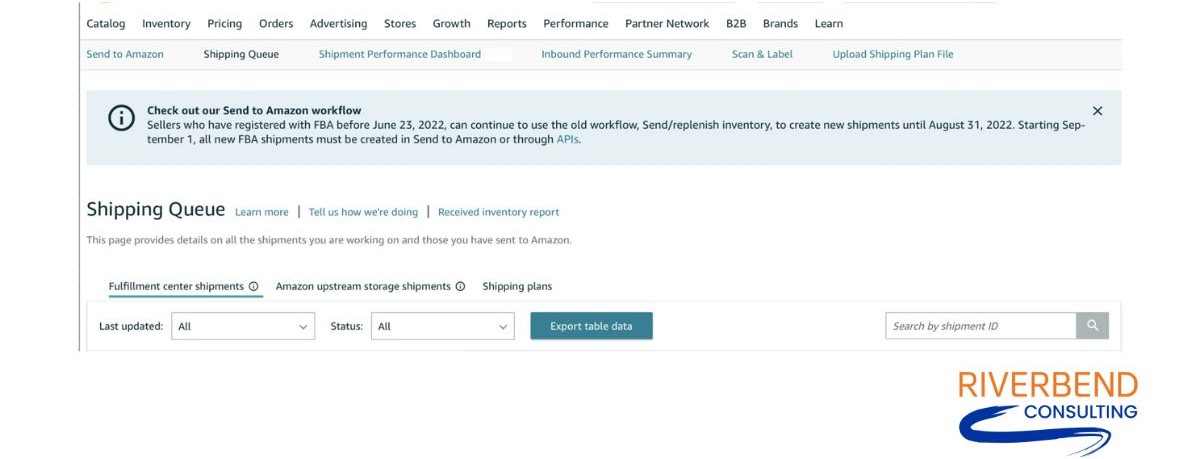
Step 10: Track your shipment: Once your shipment is on its way, you can monitor its status through the “Shipping Queue” in Seller Central. This tool allows you to track when your products are received and processed by Amazon.
Amazon FBA shipping costs
Shipping costs to Amazon FBA can vary depending on several factors, including the size and weight of your products, the shipping method you choose and the distance between your origin point and Amazon’s fulfillment centers. Here’s a breakdown of what you can expect when calculating the cost to ship to Amazon FBA.
Carrier shipping fees
The primary cost of shipping to Amazon FBA comes from the carrier fees charged for transporting your products from your location to Amazon’s fulfillment centers. These fees depend on:
- Package size and weight: Heavier and larger packages generally incur higher shipping costs. Carriers like UPS, FedEx, or Amazon’s partnered carriers calculate fees based on the dimensions and weight of your shipment.
- Shipping method: You can choose between Small Parcel Delivery (SPD) or Less Than Truckload (LTL) freight. SPD is typically used for smaller, individual boxes, while LTL is suitable for larger shipments that do not fill an entire truck. LTL can be more cost-effective for bulk shipments, but it may require more lead time.
- Distance to fulfillment centers: Shipping costs also vary based on the distance between your origin and the destination fulfillment centers. Longer distances generally result in higher fees.
Amazon partnered carrier program
If you choose to use Amazon’s partnered carriers, you may benefit from discounted shipping rates. These carriers offer competitive pricing, which will reduce your overall shipping costs. The fees for partnered carriers are calculated directly within the “Send to Amazon” workflow, making it easier to estimate and manage your expenses.
Inbound placement service fees
In 2024, Amazon introduced the inbound placement service fee that applies when shipping inventory to their fulfillment centers. These fees are based on the size of your products:
- Standard-Sized products: Fees range from $0.21 to $0.68 per unit.
- Large Bulky products: Fees range from $2.16 to $6.00 per unit.
Placement fees cover the cost of distributing your inventory across multiple fulfillment centers to optimize delivery times to customers. This change marks a significant update and requires careful consideration as you plan your shipping and inventory strategies. In some cases, it may be beneficial to explore alternative fulfillment methods, such as third-party logistics (3PL) providers, especially for large or bulky items that are disproportionately affected by these new fees.
Preparation and labeling fees
If your products require additional preparation or labeling that you cannot complete yourself, Amazon offers services to handle these tasks. However, these services come with additional fees:
- Labeling: Amazon charges a fee for labeling products if you opt not to do it yourself.
- Prep services: Fees may also apply for tasks such as polybagging, bubble wrapping, or taping.
These fees can add up, especially if you’re shipping large quantities, so it’s important to factor them into your overall cost calculations.
Packaging costs
While not a direct shipping fee, the cost of packaging materials (boxes, packing tape, labels) is another expense to consider. Proper packaging ensures that your products arrive at Amazon’s fulfillment centers in good condition, reducing the risk of damage and potential returns.
Additional costs
Depending on your specific situation, you might encounter additional costs, such as storage fees if your products take up space in Amazon’s warehouses before they are sold. If your products do not comply with Amazon’s preparation or labeling guidelines, you may incur unplanned costs for rework or non-compliance fees.
How can packaging impact your Amazon FBA shipping plan?

If you don’t take the time to package your items adequately, there is a chance that your products can be damaged en route to fulfillment centers or get lost.
Amazon reserves a right to refuse, return and repackage items that don’t meet their packaging requirements, and can go to extreme lengths such as disposing of your inventory or blocking future shipments to fulfillment centers if your packaging doesn’t meet its requirements.
Failure to comply with Amazon’s packaging requirements can also mean:
- Poorly packaged goods may get damaged in transit.
- Poorly labeled inventory might get lost while enroute or once inside fulfillment centers.
- Over-packaging means increased costs, not to mention waste and damage to the environment.
- Poorly packaged items can negatively impact your brand reputation. If Amazon ships your items in damaged cases you may attract negative reviews and customer dissatisfaction.
Amazon marks improperly labeled products as unsellable and may enforce a hefty non-compliance fee. To avoid these problems, stick to Amazon’s rules of packaging inventory for FBA shipment. Correct packaging and prep helps reduce delays in receiving time, protects your inventory while in the Amazon fulfillment centers, and creates a better customer experience.
If you use the Amazon prep service, Amazon will prepare all eligible products for a per-unit fee. After you’ve built a shipping plan, Amazon will provide an estimate of the prep fees for the products in question. There are usually a few issues with the Amazon “prep guidance” you should be aware of before taking advantage of this service.
- Sometimes your outlined prep guidance is ignored.
- The fulfillment center sometimes runs out of appropriate packaging materials like the correct box size or envelopes.
- Sometimes the prep guidance is wrong with the Amazon system where some products don’t fall in any category or multiple categories.
How to protect your inventory en route to fulfillment centers
You are responsible to ensure that you prep your inventory in a way that it survives inbound shipping to Amazon fulfillment centers and customers. This means following certain prep guidance when prepping your inventory, like:
- Box fragile items like makeups with appropriate dunnage
- Shrink-wrap any items that might leak when squeezed
- Shrink-wrap also items that might accidentally open or spill, leading to a customer concluding that the item was sold used
- If you package your items in boxes, ensure that you use the correct size boxes so items inside are not crushed.
- If your items are in a box, seal the box appropriately to avoid any accidental openings
Packaging and shipping go hand in hand
Creating a shipping plan can be an intimidating process. How to ship inventory to Amazon FBA requires careful consideration and due diligence. With the new ‘Send to Amazon’ workflow, you’ll be able to save templates and streamline your process for future shipments. But that’s not enough on its own.
There are more than 2 million registered sellers on the Amazon platform, each shipping different products to Amazon fulfillment centers. With that number, anything can happen to your inventory in transit to the Amazon warehouses or customers. Don’t assume your job is done after you’ve chosen a product and once your goods are in transit.
Protecting your inventory means ensuring that your customers don’t receive damaged goods and taking pro active measures to adequate pack and transport your precious cargo. Improper packaging can mean Amazon disposes of your inventory or blocks you from shipping anything to their fulfillment centers in the future. If you need help appealing prep guidance or dealing with other Amazon shipping challenges, contact Riverbend Consulting. We’re here to help.
Seller Account Health. Solved.