Building a solid brand presence on Amazon isn’t easy, especially with the growing competition. Fortunately, Amazon Sponsored Products offer a powerful way to get your products seen by more shoppers, helping you expand your reach and ultimately increase sales. If you’re wondering whether Sponsored Products are right for you or how they work, this guide will walk you through the essentials. Let’s explore what Sponsored Products are, why they’re so prominent on Amazon and how they can help boost your brand.
What are Amazon Sponsored Products?
Amazon Sponsored Product ads are pay-per-click (PPC) ads designed to promote individual products in highly visible areas on the Amazon platform. Sponsored ads appear on product pages and search results, prominently placed where customers actively search for similar items.
Sponsored Products target specific keywords or products, helping your Amazon listings appear in front of relevant audiences. For sellers and brands, this means getting in front of customers who may have yet to find your products. Unlike traditional ads, these placements are integrated into the shopping experience, meaning customers see your products while they’re already searching to buy.
Think of Sponsored Products as a way to level the playing field. You can use these ads to get your products in front of a broad audience, even if your organic rankings are still growing. It’s a valuable tool for driving visibility and building traction, especially if you’re new to Amazon or trying to break into a highly competitive category.
When did Amazon launch Sponsored products?
Amazon launched its Sponsored Products program in 2012, recognizing sellers needed better ways to promote their items. Initially, Sponsored Products were available to select sellers, but over time, Amazon expanded the program to make it accessible to professional sellers and large brands.
Over the years, Amazon has continued refining the Sponsored Products program, adding features like automated targeting and campaign performance tracking to offer more control and insights. Amazon Sponsored Products are a mainstay and have become an essential part of most sellers’ advertising strategies.
What is the Amazon Overall Pick?

Unlike Sponsored Products or Sponsored Brands, which are paid advertising placements, the Amazon Overall Pick designation is awarded organically based on Amazon’s assessment of a product’s performance. This label is typically given to items that demonstrate strong sales, high customer ratings and consistent quality in a specific category, signaling that Amazon recommends them as a top choice for shoppers.
Why are there so many sponsored ads on Amazon?
Sponsored ads have become increasingly popular because they offer more control over visibility and can lead to increased sales. As competition grows, many sellers need help to rank organically, especially in highly competitive categories. Sponsored products allow you to get your items seen, even if your organic ranking isn’t high.
How much does Amazon charge for sponsored ads?
Amazon Sponsored Products operate on a cost-per-click (CPC) model, which means you’re only charged when a customer clicks on your ad. The cost per click varies based on the competitiveness of your keywords, your bid and the category of your products. While there’s no flat click rate, you can set daily budgets and bids to control how much you spend on each campaign.
The average cost per click ranges from a few cents to several dollars, depending on demand. Categories, like electronics, may see higher bids due to intense competition. You can control your ad spend through budget settings, allowing you to adjust your spend based on your advertising goals. Amazon also provides performance reports so you can optimize campaigns to improve your return on ad spend (ROAS). So whether you’re working with a modest budget or have room for a larger investment, you can tailor your ad campaigns to fit your needs.
What is a Sponsored Brand?
Sponsored Brand ads feature a brand logo and a headline with a selection of products at the top of search results. This format is ideal for brands looking to boost awareness and establish themselves within their category.
With Sponsored Brands, you can showcase multiple products in one ad, making it easier to introduce customers to a broader range of products. For example, if you sell sporting goods, you could use a Sponsored Brand ad to feature your top three products under a single ad and a branded message. This promotes individual products, reinforces your brand identity and helps customers remember your business.
Sponsored Brand ads are highly customizable. You can experiment with different headlines to see what resonates with your target audience. Sponsored Brand ads allow you to link to a custom Amazon Store, where customers can explore your entire catalog. This option is especially valuable to build long-term brand recognition and increase loyalty.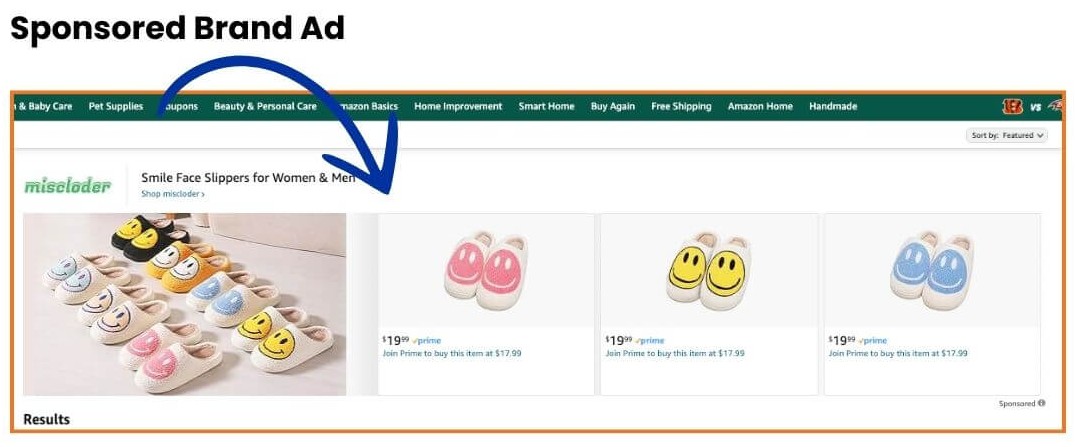
The benefits of using Sponsored Products for your Amazon business
Amazon Sponsored Products offer several benefits, particularly in building brand reach and driving sales. Here are a few key benefits:
1. Enhanced visibility: Sponsored Products allow you to reach customers who may have yet to discover your products organically. Increased exposure can drive traffic to your listings, growing sales.
2. Targeting options for Amazon sponsored products: You can reach customers based on their search behavior with keyword and automated targeting options. This helps ensure your ads are shown to the most relevant audience, increasing the chances of conversions.
3. Budget control: Amazon’s cost-per-click model lets you set a budget that suits your business so you can manage your ad spend effectively. You’re not charged unless someone clicks on your ad, giving you more control over your return on investment.
4. Performance insights: Amazon’s reporting tools provide insights into campaign performance, helping you see which ads work best. This data allows you to adjust your strategy, test different keywords and make informed decisions to improve results.
5. Building brand recognition: Sponsored Products help customers become more familiar with your brand, even if they don’t make an immediate purchase. Over time, this exposure builds brand recognition, increasing the likelihood of repeat visits and purchases.
Do you need to be Brand Registered to use Amazon Sponsored Products?
One of the most common questions Amazon sellers have is whether they need to be enrolled in Amazon’s Brand Registry to use Sponsored Products. The good news? You don’t have to be Brand Registered to access Sponsored Products. Amazon makes this advertising option available to all professional sellers, allowing sellers with or without Brand Registry to increase their product visibility on Amazon’s platform.
Sponsored Products vs. Sponsored Brands
When considering advertising options on Amazon, it’s essential to understand the difference between Sponsored Products and Sponsored Brands. While sponsored product ads are available to all eligible sellers, Sponsored Brand ads require Brand Registry enrollment.
Benefits of Brand Registry for Sponsored Products
While Brand Registry isn’t required for Sponsored Products, it can provide certain advantages that indirectly boost ad performance. Brand Registry gives sellers access to A+ Content (enhanced product descriptions) and Amazon Stores (customized brand storefronts), which can significantly improve conversion. High-quality A+ Content and a well-designed store often lead to better customer engagement, potentially improving ad performance and return on ad spend (ROAS).
Eligibility requirements for Sponsored Products without Brand Registry
If you’re not brand registered but want to use Sponsored Products, you must:
- Have a professional seller account in good standing.
- List products within Amazon’s eligible categories.
- Ensure listings meet Amazon’s requirements for images, product details and pricing.
You can start running Sponsored Products campaigns without enrolling in Brand Registry if you meet these requirements.
Expanding reach: Sponsored Products appearing on premium sites beyond Amazon
Amazon Sponsored Product ads now appear on premium third-party sites and apps, including Lifehacker, Hearst Newspapers, Pinterest, Raptive, BuzzFeed, Ziff Davis and Mashable. This move means that you can now reach potential customers across a much broader digital landscape, extending the visibility of your products beyond Amazon’s marketplace.
Sponsored Products ads displayed on these sites will link directly to the Amazon product detail page, creating a seamless path to purchase. This exposure can be especially beneficial for categories where customers frequently discover products through browsing and recommendations on social platforms and content sites.
Ad placements on third-party websites and apps are activated automatically—no additional action or setup is needed. Amazon’s algorithms determine when and where to show your Sponsored Products based on existing campaign parameters and user interests. Amazon’s statement clarifies: “Your Sponsored Products ads will automatically show up when we think a customer is likely to be interested in your product, based on relevant page context, the campaign, and cost-per-click parameters that you have already established.” Amazon Sponsored Product Ads Update 2023 (Advertising.Amazon.com)
Your ads have the potential to reach customers across popular sites without requiring additional ad management or configuration. This “set and expand” approach benefits you from extended placements without increasing your workload.
Monitoring campaign performance on external sites
Amazon offers insights through the Sponsored Products Placement Report to help you evaluate the impact of these placements. This report details the performance of your ads across different placements, including on external sites and apps. By reviewing metrics like click-through rate (CTR), cost-per-click (CPC), and conversions, you can assess how these additional placements contribute to campaign success and adjust budgets or bids if needed.

How to create an Amazon Sponsored Products ad
Setting up a successful Sponsored Products campaign involves careful planning and execution, from choosing the right keywords to setting an adequate budget. Here’s a step-by-step overview.
Step 1: Eligibility and product selection
To start with Sponsored Products, ensure you meet Amazon’s eligibility requirements. Sponsored Product ads are available to Amazon sellers with active listings in good standing within the Amazon Seller Central platform. Typically, any individual professional seller or vendor can create Sponsored Products ads. If your account is in poor standing, it’s best to troubleshoot and work with Amazon problem solving experts to get your account in order before launching an ad strategy.
Once eligible, select the specific product or products you’d like to promote. Amazon recommends focusing on products with good sales history, positive reviews and high-quality images, as these factors significantly impact ad performance. Highlighting your best-performing products in Sponsored Product ads helps maximize the return on your advertising investment.
Step 2: Choose your targeting option (manual vs. automatic)
One of the essential choices you’ll make when setting up an Amazon Sponsored Products ad is selecting the targeting type.
Automatic targeting: In this mode, Amazon’s algorithm automatically targets relevant keywords and products based on your product listing details. Automatic targeting is ideal for sellers new to advertising, as it allows Amazon’s system to test various keywords and placements to determine what works best. Monitor these campaigns regularly, as Amazon’s broad targeting may lead to clicks on unrelated search terms.
With automatic targeting, Amazon’s algorithm selects keywords and products based on your listing details. This quick-to-set-up option uses four match types: Close Match, Loose Match, Substitutes and Complements to reach relevant audiences. Amazon’s reporting reveals top-performing keywords. With Amazon managing currency and bid adjustments, you can extend campaigns to other marketplaces.
Manual targeting: This option gives you complete control over which keywords and product placements your ad targets. Manual targeting allows for more precise targeting but requires researching and choosing relevant keywords. Use Amazon’s Keyword Planner tool to identify high-volume, relevant keywords for your product. Manual targeting is highly effective for experienced sellers who want to refine their advertising strategy and target specific search terms that align with their products.
Step 3: Select a keyword match type
You’ll need to choose the match type for your keywords for manual targeting campaigns. Amazon offers three match types to define how broadly or narrowly you want your ads to appear:
- Broad Match: Ads are shown for target keyword variations, including synonyms and related terms. Broad matches reach a wider audience but may result in less precise targeting.
- Phrase Match: Ads appear for searches containing the exact phrase you’ve specified and any additional words before or after it. This match type offers a balance between reach and relevance.
- Exact Match: Ads show only for the exact keyword phrase. This match type narrows your audience but increases the likelihood of clicks from highly interested customers.
Choosing the right match type helps you control who sees your ad and optimizes your budget. Start with a mix of match types, then adjust based on performance data.
Step 4: Set a budget and bid
Amazon Sponsored Products operate on a cost-per-click (CPC) basis, meaning you’re only charged when someone clicks on your ad. When setting up your ad, Amazon will prompt you to set both a daily budget and a bid amount:
1. Daily budget: Decide how much you’re willing to spend each day on your campaign. Amazon recommends starting with a moderate daily budget, allowing you to test different strategies without overspending. You can increase your daily budget accordingly as you gain more insights into which keywords and placements work best.
2. Bid amount: You’ll set a maximum bid for each keyword or the highest amount you will pay for a click. Amazon offers a suggested bid range for each keyword based on current competition, but you can adjust this depending on your budget and campaign goals. Higher bids can increase your ad’s visibility, but careful management is essential to avoid overspending.
To optimize bids, experiment with Amazon’s dynamic bidding options:
- Dynamic Bids – Down Only: Amazon lowers your bid when it predicts a lower likelihood of conversion.
- Dynamic Bids – Up and Down: Amazon adjusts your bid up or down based on conversion likelihood, ideal for competitive keywords.
- Fixed Bids: Amazon applies the exact bid amount you set. This is useful if you have a fixed budget and prefer more control.
Amazon’s CPC rates vary across categories, with electronics and beauty products generally having higher CPCs due to intense competition. Monitor CPC data within your niche to make informed bidding choices.
Step 5: Write Compelling ad copy and optimize product pages
Though Amazon Sponsored Products don’t require separate ad copy (as they use your existing product listing information), optimizing your product page is crucial. Ensure your title, bullet points, images and description are complete, keyword-optimized and engaging. High-quality, informative product pages increase the likelihood of conversions.
Consider including keywords in your title and description that potential customers may search for and ensure your images meet Amazon’s guidelines. Well-optimized product pages enhance your organic ranking and ad performance, as customers are more likely to buy when they see a polished, informative listing.
Step 6: Launch, monitor and optimize your campaigns
Once your campaign is live, Amazon provides performance reports to help you track its effectiveness. Key metrics include:
- Click-through rate (CTR): The percentage of ad impressions that resulted in clicks. Higher CTRs indicate your ad is resonating with viewers.
- Conversion rate: The percentage of clicks that lead to purchases. A strong conversion rate means your listing effectively converts interest into sales.
- Advertising Cost of Sales (ACoS): Measures the ratio of ad spend to sales revenue. Lower ACoS indicates efficient ad spending and effective targeting but is not the leading performance indicator.
If specific keywords aren’t delivering, consider lowering bids or switching to a different match type. Conversely, increase bids on high-performing keywords to maximize visibility.
Amazon’s campaign optimization tools, like negative keywords, help you prevent ads from appearing for irrelevant search terms. For example, if you sell premium kitchen tools, adding “cheap” as a negative keyword can prevent wasted ad spend on customers looking for budget options.
Step 7: Experiment with A/B testing
Testing different elements of your Sponsored Products campaigns is a powerful way to see what resonates best with your target audience. Amazon offers A/B testing tools through their Amazon Experiments program, where you can test variations of product titles, images and descriptions to see which versions drive better performance. Analyzing these results helps refine your listing, boosting ad performance and organic sales.
For Sponsored Products, you can also experiment with campaign structures. For example, try creating separate campaigns for different product types or target keywords, then monitor each campaign’s performance individually to identify which strategy works best.
Creating an Amazon Sponsored Products ad takes more than setting a budget and hitting “launch.” Each step, from selecting products and targeting keywords to setting budgets and optimizing product pages, plays a crucial role in your campaign’s success.
Maximizing ROI with sponsored product ads
Amazon Sponsored Products are a powerful tool for helping you stand out. Investing in these ads can drive visibility, increase sales, and make your brand memorable to shoppers. As with any advertising strategy, success requires thoughtful planning and a willingness to adapt. Experiment with different campaigns, monitor your results and focus on what brings the best return.
Riverbend Consulting works with you to keep your account in top shape, from navigating performance notifications to resolving Amazon seller account suspensions. Contact Riverbend Consulting today for the guidance and support you need to stay on track and grow confidently.
Seller Account Health. Solved.